Unity Switches From Mono To CoreCLR: What Do Developers Actually Get?

Minh Khoa
Author
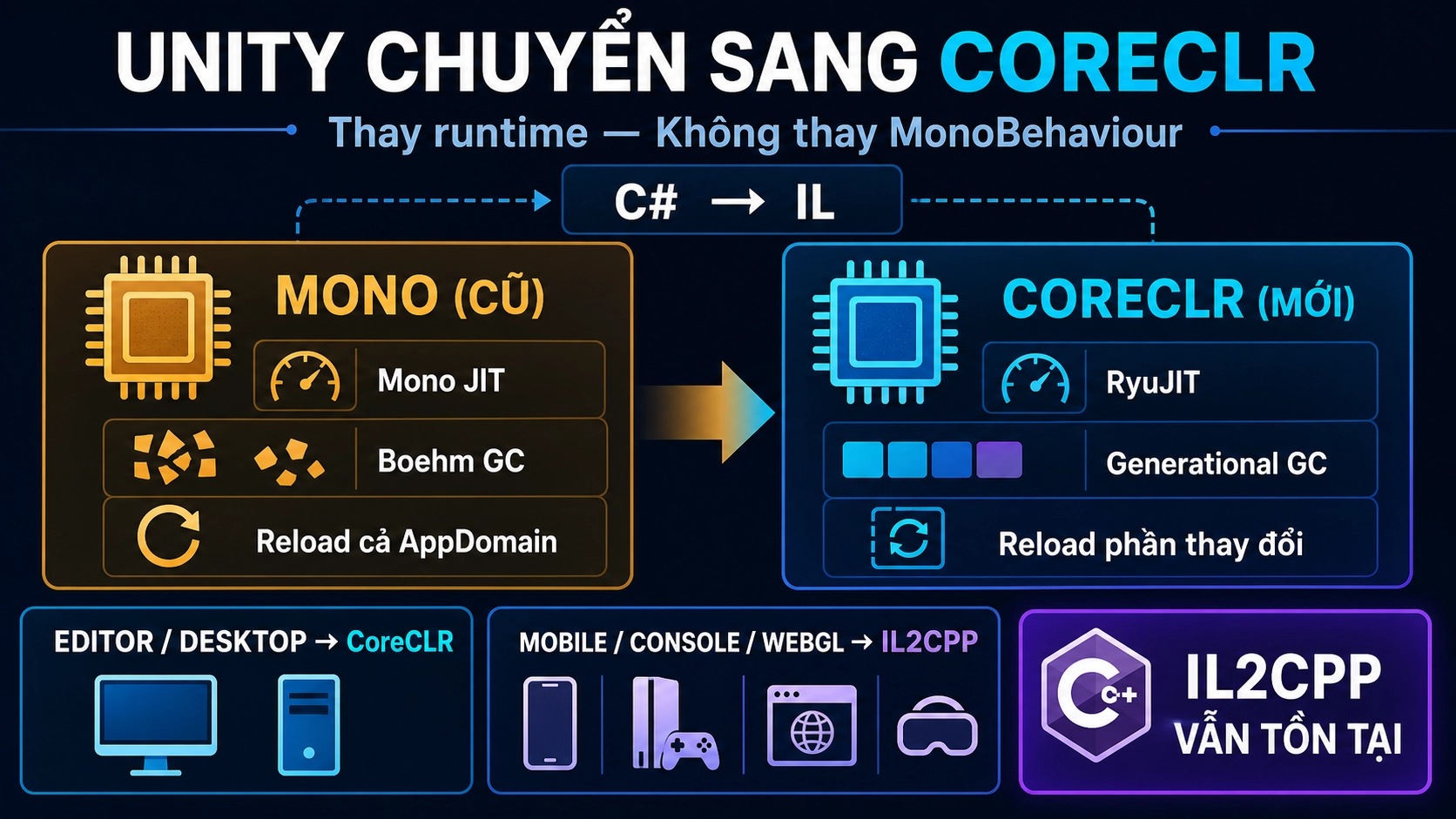 Short answer: CoreCLR it replaces the Mono runtime underneath Unity, not
 MonoBehaviour and also does not remove IL2CPP. The three most noteworthy changes are a more modern Garbage Collector, better runtime for managed code, and faster code reload in the Editor.
When people hear “Unity drops Mono,” it is easy to think:
Mono bị bỏ
→ MonoBehaviour biến mất?
→ Project phải viết lại?
→ IL2CPP không còn cần thiết?
In practice, you still write code as before:
public class Player : MonoBehaviour
{
    private void Update()
    {
        transform.Translate(Vector3.forward * Time.deltaTime);
    }
}
GameObject, MonoBehaviour, Awake, Start, Update and Coroutine remain unchanged. What is replaced is the execution and management engine for C# under Unity API.
CoreCLR Where Is It Located?
C code# is not CPU run directly. Roslyn compiles it into IL and packages it into an assembly like Assembly-CSharp.dll.
C#
↓ Roslyn Compiler
IL trong Assembly-CSharp.dll
↓ Mono JIT hoặc CoreCLR RyuJIT
Machine Code
↓
CPU
Mono and CoreCLR like two versions of the same interpreter: both receive IL and then translate it into machine code when needed. CoreCLR is a newer runtime, developed alongside the modern .NET ecosystem.
MonoBehaviour = Unity lifecycle API
Mono/CoreCLR  = Runtime chạy managed C# phía dưới
The name MonoBehaviour is only a API historical name. It does not require Unity to continue using the Mono runtime.
Mono And CoreCLR How Are They Actually Different?
| The differences | current Mono | CoreCLR new |
|---|---|---|
| JIT compiler | Mono JIT | RyuJIT |
| Garbage Collector | Boehm GC, non-moving | Precise, moving, generational GC |
| C platform# | Moving away from modern .NET | NET 10 and C# 14 |
| Code reload | Usually reloads the entire AppDomain | More granular assembly reload |
| Tooling | Unity’s own toolchain | Closer to the standard .NET debugger, profiler, and MSBuild |
Among them, GC and code reload are the two changes most likely to affect real projects.
1. A More Modern Garbage Collector
Unity currently uses Boehm GC. This is GC conservative and non-moving: where an object is placed in memory usually stays there.
CoreCLR uses generational GC:
Object mới tạo       → Gen 0
Sống qua collection  → Gen 1
Sống lâu hơn nữa     → Gen 2
The idea is based on a very practical observation:
Most newly created objects die very quickly.
For example UI creating many temporary strings:
private void Update()
{
    scoreText.text = "Score: " + score;
}
Short-lived objects mainly live in Gen 0. GC can focus on processing the young object region instead of frequently scanning the entire managed heap.
CoreCLR GC can also move live objects to compact gaps:
Trước: [Live][Dead][Live][Dead][Live]
Sau:   [Live][Live][Live][Free.........]
This reduces fragmentation and provides a better foundation for memory management.
But do not interpret this as:
GC mới tốt hơn → allocation trong Update không còn vấn đề
Allocation still has a cost. Collection at the wrong time can still cause frame spikes. CoreCLR helps the garbage collector work better; it does not make garbage free.
2. Faster Code Reload, But Static State Is Easier to Cause Bugs With
Unity with Mono often reloads the entire AppDomain when compiling code or entering Play Mode. A familiar side effect is that static state gets reset:
public static class GameSession
{
    public static int Score;
    public static event Action OnGameOver;
}
Many projects unconsciously rely on this behavior:
Enter Play Mode
→ Domain Reload
→ Static field trở về giá trị ban đầu
CoreCLR switches to more granular reload via AssemblyLoadContext. Unchanged assemblies can be kept; only the necessary code is reloaded.
The Editor has less work to do, but static state is no longer guaranteed to be reset for you.
For example: events being called multiple times
private void OnEnable()
{
    GameEvents.OnGameOver += ShowGameOver;
}
If the code does not unsubscribe:
Play lần 1 → 1 listener
Play lần 2 → 2 listeners
Play lần 3 → 3 listeners
An event may call UI three times, keep old objects in memory, and prevent the old assembly from unloading.
Cleanup must be explicit:
private void OnDisable()
{
    GameEvents.OnGameOver -= ShowGameOver;
}
Not just events, we also need to actively clean up:
- Static caches and singletons.
- Threads, timers, and file watchers.
- Cancellation tokens.
- Native handles and network connections.
CoreCLR helps Unity reload less code. In return, projects should not rely on Domain Reload to silently clean up state for them.
3. RyuJIT And More Modern .NET
CoreCLR uses RyuJIT with Tiered Compilation:
Method được gọi lần đầu
→ Compile nhanh để chạy sớm

Method trở thành hot
→ Compile lại với optimization mạnh hơn
The runtime does not need to heavily optimize a method that only opens Settings once, but can focus on methods that are called millions of times.
Unity is also moving toward .NET 10, C# 14, MSBuild, and the standard .NET tooling. The most obvious benefits at first may be:
- Compile and reload code faster.
- Debugger, profiler, and IDE better.
- Access to API and more modern .NET packages.
- Managed hot paths have a better chance of being optimized well.
However:
Mono → CoreCLR ≠ FPS tự động tăng mạnh
In the early stages, Unity is prioritizing compatibility and performance parity. Whether a game becomes faster still depends on whether the bottleneck is in managed code, rendering, physics, GPU or elsewhere.
CoreCLR Is there Replacement IL2CPP or not?
No. The two systems get IL to CPU through two different paths.
CoreCLR — JIT when running
C# → IL → CoreCLR JIT → Machine Code
Like a translator standing next to you: whichever sentence you need, they translate it right then as it is spoken.
Suitable for the Editor, Desktop Player, debugging, and fast iteration.
IL2CPP — AOT before running
C# → IL → C++ → Native Compiler → Machine Code
Like translating the entire document first, printing it as a complete book, and only then releasing it.
IL2CPP is still necessary for Android, iOSMeta Quest, consoles, WebGL and platforms that do not allow JIT.
A future project may use all three:
Trong Editor        → CoreCLR
Build Android/iOS   → IL2CPP
Code Jobs/ECS       → Burst
So moving the Editor to CoreCLR does not mean APK using IL2CPP will automatically receive optimization from RyuJIT.
Do Old Projects Need to Be Rewritten?
Most gameplay code will still run normally. Areas that need closer checking include:
- Static fields, static events, and singletons.
- Editor tooling and reflection.
- Native plugins or unsafe code.
- Old DLLs targeting .NET Framework.
- Save systems that use
BinaryFormatter. - Code that depends on
AppDomainorAssembly.Location. - Deterministic simulation.
For example, BinaryFormatter is removed in newer .NET because of security issues. Old save systems should be moved to System.Text.Json, JsonUtility or a clearly managed format.
CoreCLR may also produce results floating-point slightly different from Mono JIT. Small errors are usually insignificant, but they can cause desync with lockstep multiplayer, Photon Quantum, or deterministic replay after thousands of ticks.
Timeline and How to Prepare
The old roadmap put CoreCLR officially in Unity 6.8. The newer announcement at Unite Seoul in 7/2026 brings CoreCLR,.NET 10 and C# 14 into Unity 7, expected in early 2027.
Unity 6.6
→ Fast Enter Play Mode mặc định cho project mới

Unity 6.7
→ Experimental CoreCLR Desktop Player để test

Unity 7
→ CoreCLR + .NET 10 + C# 14 chính thức
To prepare a project:
- Enable Fast Enter Play Mode and try turning off Domain Reload.
- Enter/Exit Play Mode multiple times to find state that is being retained.
- Review static fields, singletons, and static events.
- Actively clean up threads, timers, callbacks, and events.
- Run Project Auditor, check Domain Reload warnings.
- Regression test save/loadplugins, and deterministic simulation.
If the project still runs correctly when Domain Reload is turned off, that is a good sign that the architecture is more ready for CoreCLR.
How to Remember
MonoBehaviour = Unity lifecycle API
CoreCLR       = Runtime mới chạy managed C#
IL2CPP        = Compile IL thành native code trước khi chạy
Burst         = Compiler tối ưu cho Jobs/ECS
The key takeaway: CoreCLR does not change much how we write gameplay. It changes how Unity runs C#, handles memory, and reloads code underneath. The biggest initial benefit may not be FPS an immediate increase, but a faster Editor and a C# platform that is no longer falling behind the modern .NET ecosystem.