Unity••16 min•238 views••
Architecture UI In Unity: MVC, MVP & MVVM

Minh Khoa
Author
UI Architecture in Unity: MVC, MVP, MVVM
**Goal:**Understand clearly why UI and logic are often a "mess" in Unity, master three professional architectures (MVC, MVP, MVVM) and know how to apply them appropriately to each real-world situation.
📌 INTRODUCTION — IDENTIFYING THE REAL PROBLEM
Example Anti-Pattern
// NewStationUI.cs — UI class
private void RefreshUI()
{
    bool canAfford = GameController.Instance != null
                     && GameController.Instance.CanAfford(cost);

    unlockButton.interactable = canAfford;
}

private void OnClickUnlock()
{
    if (GameController.Instance.SpendMoney(_currentData.UnlockCost))
    {
        _currentData?.OnConfirm?.Invoke();
        Hide();
    }
}
// GamePlayScreen.cs — UI class
public void UpdateUpgradeIconState()
{
    var upgrades = DatabaseManager.Instance?.InitConfig?.Upgrades;

    if (upgrades != null && GameController.Instance != null)
    {
        foreach (var data in upgrades)
        {
            if (!UpgradeState.IsPurchased(data.ID)
                && GameController.Instance.CanAfford(data.Price))
            {
                canAffordAny = true;
                break;
            }
        }
    }
}
Problem
- UI know too much about the system.
- Logic is scattered.
- Hard to test.
- Hard to maintain.
- Designer edits UI can break the logic.
🔑 PART 1 — SEPARATION OF CONCERNS
Model
- Manages data.
- Contains business logic.
- Does not know UI exists.
View
- Only displays.
- Receives input from the user.
- Does not contain business logic.
Controller / Presenter / ViewModel
- Connects Model and View.
- Coordinates the data flow.
- Does not contain UI detailed code.
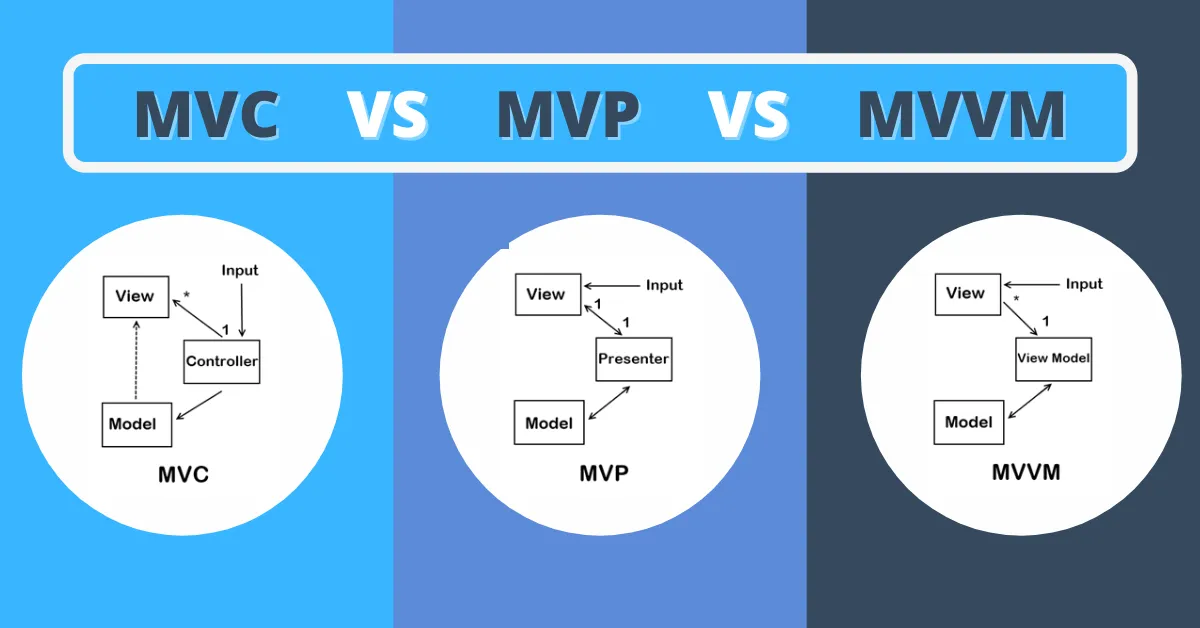
🔷 PART 2 — MVC
Data Flow
User Input
    ↓
   View
    ↓
Controller
    ↓
  Model
    ↓
 Notify
    ↓
   View
Advantages
- Simple.
- Little boilerplate.
- Easy to learn.
Disadvantages
- Coupling between View and Model.
- Controller easily bloats.
- Harder to test MVP.
🔶 PART 3 — MVP
Data Flow
User Input
    ↓
   View
    ↓
Presenter
    ↓
  Model

Presenter
    ↓
   View
Characteristics
- View does not know the Model.
- Presenter is the only bridge.
- Uses Interface for communication.
Advantages
- Easy to test.
- View is extremely "dumb."
- Easy to maintain.
Disadvantages
- Many Interfaces.
- Presenter easily bloats.
🟣 PART 4 — MVVM
Data Flow
Model
  ↕
ViewModel
  ↕
Data Binding
  ↕
 View
Characteristics
- Uses ReactiveProperty / Observable.
- View updates itself.
- No need to call RefreshUI manually.
Advantages
- Reactive.
- Strong Data Binding.
- Good testability.
Disadvantages
- High learning curve.
- Adds dependency (UniRx / R3).
- Easy over-engineering.
🏗️ PART 5 — PRACTICAL APPLICATION
Screens
Recommendation:
- Thin Presenter
- EventBus
- Screen only renders
Popups
Recommendation:
- MVP
Example:
- NewStationPopup
- UpgradePopup
- ConfirmationDialog
Widgets
Recommendation:
- MVVM-lite
- ReactiveProperty Binding
For example:
- MoneyBar
- HealthBar
- Minimap
🚨 PART 6 — ANTI-PATTERNS
1. Circular Reference
UI → Controller
↑       ↓
└───────┘
Signs
- UI directly calls Singleton.
- Singleton holds a reference UI.
2. Fat View
private void OnEnable()
{
    var model = StationManager.Instance.GetCurrentStation();

    titleText.text = model.Name;
}
The View is doing the Presenter’s work.
3. Anemic Presenter
public void OnUnlock()
{
    _model.Unlock();
}
The Presenter only forwards.
4. Over-Engineered ViewModel
public ReactiveProperty<float> ButtonWidth;
public ReactiveProperty<Color> ButtonColor;
public ReactiveProperty<Vector2> ButtonPosition;
Not everything needs ReactiveProperty.
⚖️ PART 7 — WHEN TO USE WHICH?
MVC
Use when:
- Small game.
- Small team.
- Need to ship quickly.
MVP
Use when:
- UI complex.
- Need Unit Tests.
- Designer and Programmer work independently.
MVVM
Use when:
- MMO.
- Dashboard.
- Realtime data.
- Reactive workflow.
🎯 CONCLUSION
3 golden questions
- Remove UI does the Logic still run?
- Change UI does the Layout need Logic changes?
- Does Logic testing need Unity?
If all 3 answers areYes→ the architecture is heading in the right direction.
Good architecture is not about using patterns — it's about being able to change your mind later without rewriting everything.