Unity••15 min•257 views••
Coroutine, Async, UniTask & Multithreading in Unity/C#

Minh Khoa
Author
1. Coroutine in Unity
Definition
- Coroutine is a mechanism for simulating asynchronous behavior in Unity.
- It runs on Unity's single main thread of Unity (not real multithreading).
- Allows “pausing” and “resuming” code through
yield return.
How it works
- Coroutine is a state machine managed by Unity.
- Every frame, Unity “ticks” the coroutine → continues from where it
yield.
Example
IEnumerator FadeOut()
{
    for (float t = 1; t > 0; t -= Time.deltaTime)
    {
        spriteRenderer.color = new Color(1,1,1,t);
        yield return null; // tạm dừng tới frame sau
    }
}
StartCoroutine(FadeOut());
Advantages
- Simple, easy to use for animation, delay, sequence.
- Integrated into Unity's loop (frame, physics, WaitForSeconds…).
Disadvantages
- Not multithreaded → does not reduce load CPU for heavy tasks.
- Easy to “leak” if the object is destroyed without StopCoroutine.
- Does not return values directly.
2. Async/Await in C#
Definition
- From C# 5.0:
async/awaitallows writing code asynchronous that looks synchronous. - Async does not mean multithreading:
- Can run on another thread (Task.Run).
- Or just “wait” I/O (without blocking the main thread).
Example
public async Task LoadDataAsync()
{
    string data = await File.ReadAllTextAsync("save.json");
    Debug.Log(data);
}
In Unity
- Unity supports C# async, but it is not hooked into the main loop by default → cannot be awaited
yield return. - Therefore there is a supporting library (UniTask).
3. UniTask in Unity
Definition
- UniTask is a library (Cysharp) that helps use async/await with Unity.
- Integration await for yield instructions (WaitForSeconds, AsyncOperation, …).
- Rewrites the system
Taskof C# in the form of struct in order to not generate garbage (Zero Allocation), absolutely optimized for Unity. - More lightweight optimized
Example
using Cysharp.Threading.Tasks;

public async UniTaskVoid Start()
{
    await UniTask.Delay(2000); // đợi 2s
    Debug.Log("Done");

    await SceneManager.LoadSceneAsync("Battle").ToUniTask();
}
Advantages
- Writes asynchronous logic more compactly than coroutines.
- Can return results (
UniTask<T>). - Works well with I/Oscene loading, web request.
Disadvantages
- Need to install an external package (UniTask).
- A complex async flow can easily create deadlocks if not careful.
4. True multithreading in C#
The API multithreading
- Thread (System.Threading.Thread)
- Low-level, direct control of threads.
- Consumes resources, less commonly used directly in games.
- ThreadPool
- A thread pool management system, more optimized.
- Task (TPL – Task Parallel Library)
- Advanced, easy to manage.
Task.Run(() => { … })to run heavy tasks in the background.
- Parallel.For / PLINQ
- Parallel processing across multiple CPU cores.
- async/await
- Combine with Task to write clean asynchronous multithreading.
Example
// Chạy hàm nặng ở background
public async Task<int> HeavyCalcAsync()
{
    return await Task.Run(() =>
    {
        int sum = 0;
        for(int i=0;i<10000000;i++) sum += i;
        return sum;
    });
}
In Unity
- Unity API (GameObject, Transform, MonoBehaviour, …) not thread-safe.
- Rule: use multithreading only for pure data processing (pathfinding, AI calc, file I/Os, network…).
- Results → return to the main thread to update the scene.
5. Overview comparison
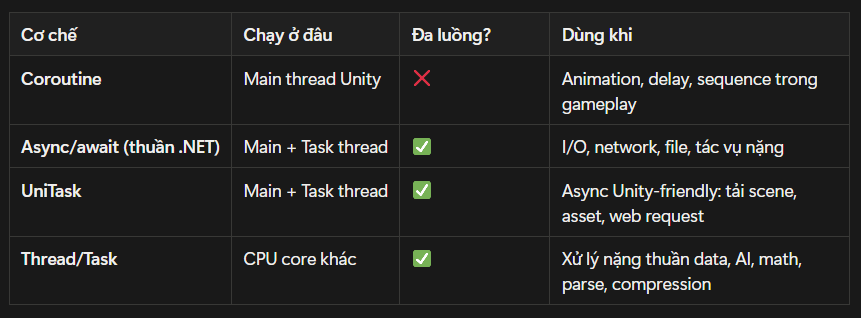 ---
---
6. Best Practices in Unity
- Coroutine: for small gameplay logic, animation, delays → easy to read, fewer bugs.
- UniTask: for scene loading, assets, web requests, waiting for async → clean code, easy to maintain.
- Task/Thread: for heavy processing (AI, pathfinding, save/load large files) → always sync the result back to the main thread using
UnityMainThreadDispatcherorUniTask.SwitchToMainThread(). - Never touch Unity API from a worker thread.
7. Conclusion
- Coroutine: not multithreading → only “time-slicing” on the main thread.
- Async/await: an asynchronous tool in C#, can run with real multithreading when using
Task.Run. - UniTask; an async bridge with Unity, helping you write concise code with good performance.
- Real multithreading (Task/Thread): used for heavy computation, but you must be extremely careful with Unity API.