Photon Fusion 2 Dedicated Server in Unity

Minh Khoa
Author
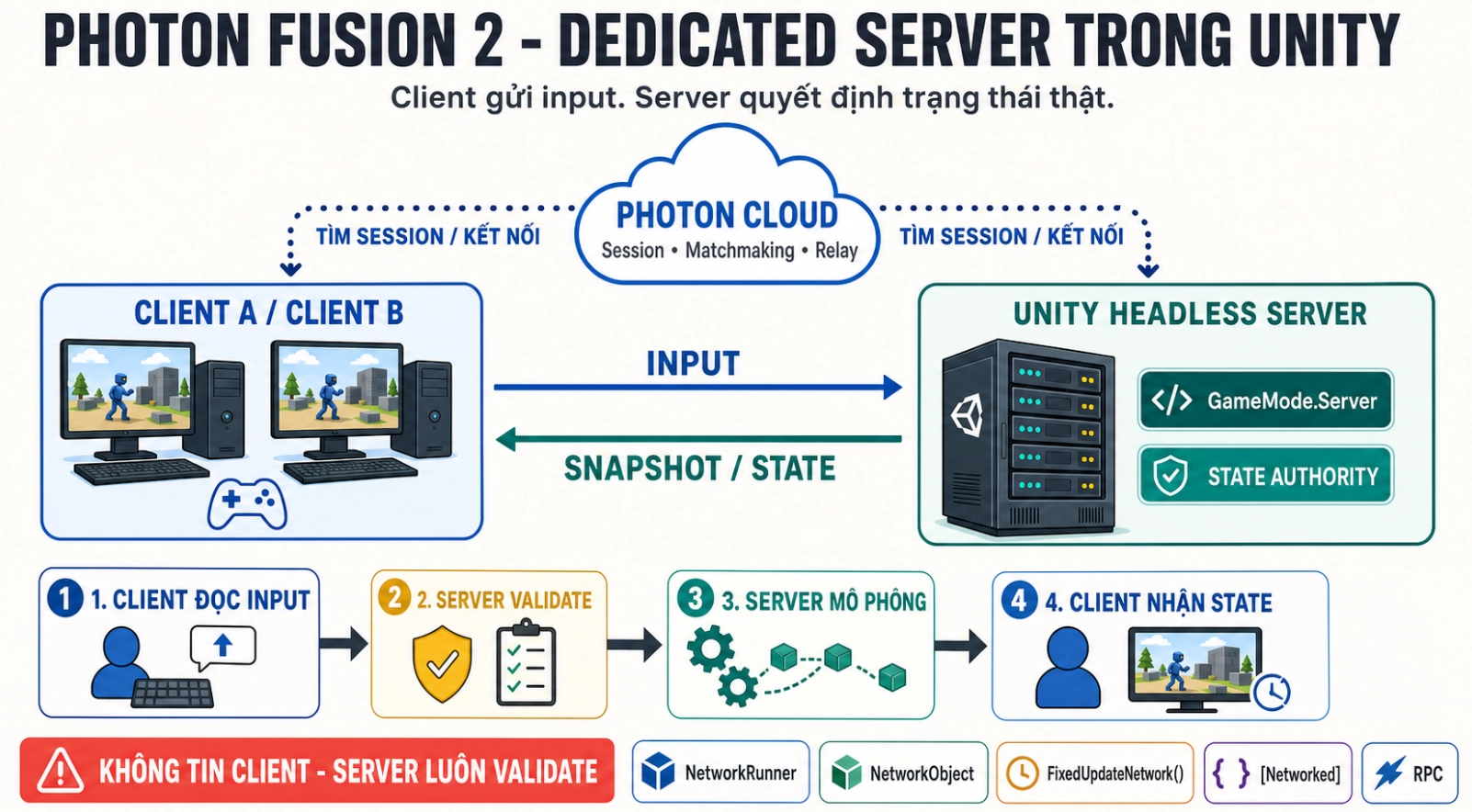 Just remember six things:
- The client sends input or requests, not the final result.
- The Unity Dedicated Server runs gameplay and keeps State Authority.
- The client keeps Input Authority on the avatar to send input and prediction.
[Networked]store state, RPC send events/requests, Input transmits actions by tick.- Photon Cloud handles session, matchmaking, and connections; Photon does not run the Unity server build for you.
- A Dedicated Server is fairer, but you have to pay hosting and operations costs.
The most important sentence: The client sends intent. The server decides the result.
1. What problem does a Dedicated Server solve?
In an offline game, there is only one game state. In an online game, each machine may see the world at a different moment.
For example:
- Client A sees that it has walked through the door.
- Client B still sees A standing in front of the door.
- A packet is arriving late.
- A modified client is trying to send an unusual speed.
The original question of multiplayer is:
Which machine has the authority to decide which state is correct?
Dedicated Server chooses one clear answer: the server is the only referee.
Movement example
The client should not send:
Vị trí của tôi bây giờ là (9999, 0, 9999).
The client should send:
Tôi đang nhấn sang phải và giữ nút chạy.
The server takes that input, applies a valid speed, checks collisions, then creates the official position.
Think of it like this:
- The client is the player.
- Input is the action the player wants to perform.
- The server is the referee.
- The snapshot is the official result sent back to everyone.
2. Photon, Unity Server, and Hosting are three different things
A Dedicated Server system usually has three layers:
| Component | Responsibility |
|---|---|
| Photon Cloud | Session, lobby, matchmaking, connection, and relay |
| Unity Headless Server | Physics, AI, damage, inventory, and win/lose rules |
| Hosting/Orchestrator | Open the process, assign ports, scale machines, and shut down |
Unity Headless Server
This is still your Unity game:
- It has a scene, GameObject and components.
- Runs gameplay code and physics if needed.
- Does not need UIcamera, audio, or rendering like the client.
- Has
NetworkRunnerstarts withGameMode.Server.
The server does not represent a local player. It exists to simulate and keep the official state.
Photon Cloud
Photon helps the server and client find each other in the same session. Photon does not run automatically:
- AI of monsters.
- Gun logic.
- Inventory.
- Match controller.
- The game's headless Unity build.
Hosting
The Unity server build needs to run on:
- VPS or a dedicated machine.
- Docker/Kubernetes.
- GameLift, PlayFab, Edgegap, Hathora, Gameye, or similar services.
So there are two kinds of costs:
- Service Photon/CCU.
- CPU, RAM, bandwidth, and server operations.
3. Dedicated, Host, or Shared?
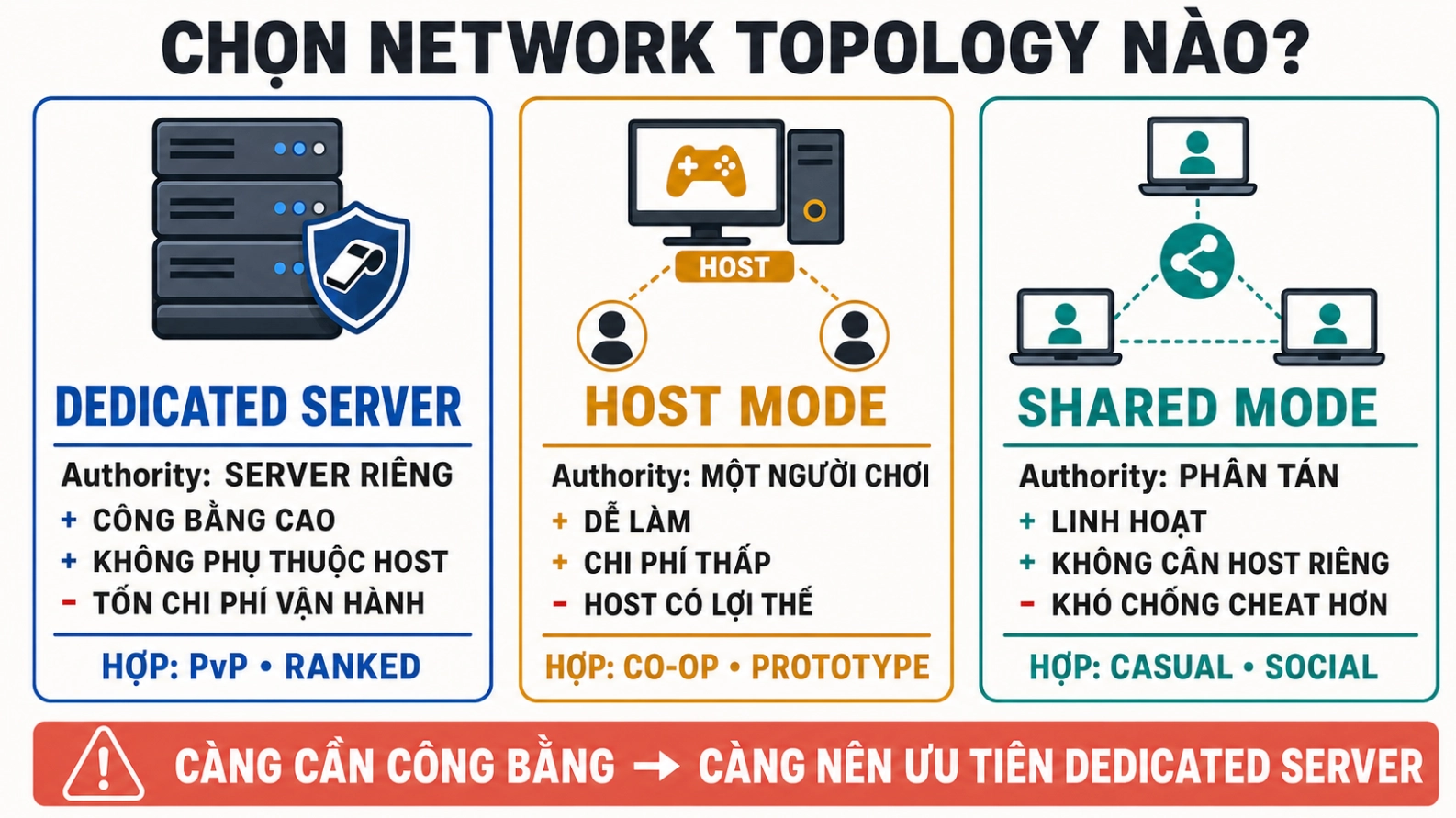 ### Dedicated Server
Strengths:
- Does not depend on one player's machine.
- The server checks all gameplay.
- Suitable for competitive games.
In return:
- Server machine costs money.
- Requires deployment, monitoring, and orchestration.
Host Mode
Host Mode uses the same mindset Client-Server:
- The Host has State Authority.
- The Host is also a player.
- Other clients connect to the host.
This is a good choice for developing gameplay first. Once the authoritative logic is stable, you can switch the peer running the server to GameMode.Server.
The downside is that the host has an advantage and the match depends on their machine.
Shared Mode
Shared Mode distributes authority and helps you prototype quickly. It is suitable when cheating does not create serious consequences.
For a competitive shooter, letting the client decide “who I hit” is usually not a good choice.
If the project has
PhotonView,PhotonNetworkorMonoBehaviourPunCallbacks, you are using PUN, not Fusion. API and the authority model of the two SDK is different.
4. Seven important key concepts
4.1 NetworkRunner
NetworkRunner is the center of a Fusion peer. It manages:
- Connections and sessions.
- Network tick.
- Input history.
- Spawn/despawn.
- State replication.
- RPC and scene.
Common roles:
Dedicated Server: GameMode.Server
Client:           GameMode.Client
Host:             GameMode.Host
A runner that has disconnected or whose start failed should not be reused. Dispose of the old instance and create a new runner.
4.2 NetworkObject and NetworkBehaviour
| Component | Simply understood |
|---|---|
NetworkObject | The identity of a network object |
NetworkBehaviour | A component containing network logic or state |
NetworkId | The unified ID of an object in the session |
Objects that often need NetworkObject:
- Player.
- Bullet.
- Door.
- Item.
- Objective.
- Match controller.
A decorative tree that does not change usually does not need networking.
4.3 State Authority and Input Authority
The two authorities have different responsibilities:
Client giữ Input Authority
        │
        │ gửi input
        ▼
Server giữ State Authority
        │
        │ gửi state chính thức
        ▼
Tất cả client
For example, the avatar of Player 3:
- Player 3 provides input for the avatar.
- The server simulates the avatar.
- The server broadcasts the avatar's state to every client.
The client can predict, but the server is still where the real state is decided.
4.4 Tick and FixedUpdateNetwork()
Fusion simulates according to the network tick, not the render frame.
Put gameplay simulation in FixedUpdateNetwork():
- Movement.
- Damage.
- Cooldown.
- Projectile.
- AI authoritative.
- Match timer.
Use Runner.DeltaTime for simulation.
Update() is still suitable for the camera, UI and collecting device input.
4.5 Prediction, rollback and re-simulation
If the client waits for the server to confirm every step, the controls will feel laggy.
Fusion lets the client predict:
- The client reads input.
- The client simulates the avatar immediately.
- The server receives the input and creates the real state.
- The client receives snapshots.
- If the prediction is wrong, Fusion corrects the state and re-simulates.
Because simulation can be run again, be careful with side effects:
- Sound.
- Particle.
- Camera shake.
- Analytics.
- Backend transactions.
These things should not be casually replayed in a tick that is re-simulate.
4.6 Input, RPC and [Networked]
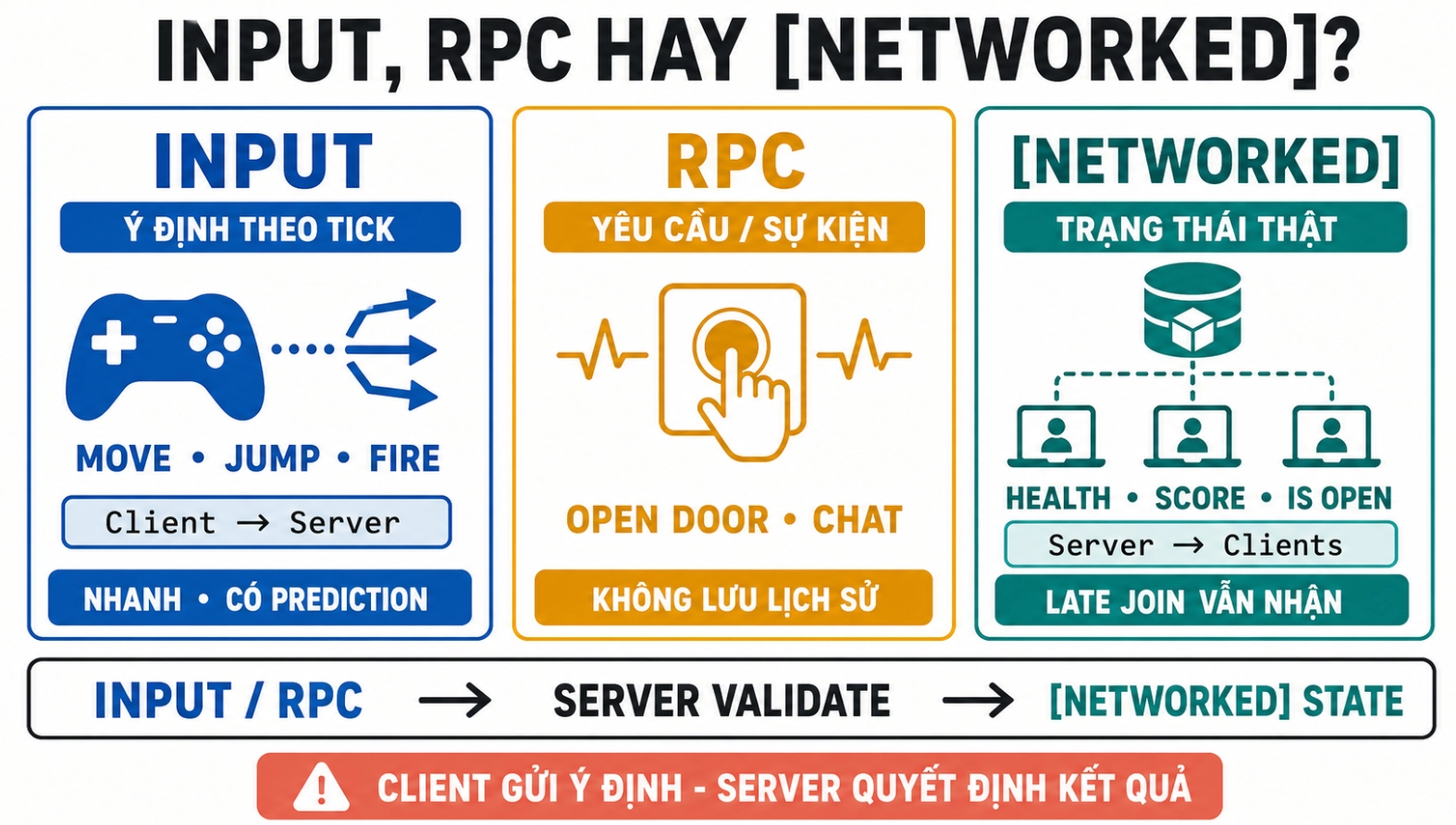 Quick selection rules:
| Need | Use |
|---|---|
| Move, jump, shoot on tick | Input |
| Open-door requests, chat, loadout selection | RPC |
| Health, score, door state | [Networked] |
Key differences:
- Input is designed for simulation and prediction.
- RPC is an instantaneous event/request, with no state history.
[Networked]is the current state; late joiners still receive it.
Example of opening a door:
Client gửi RPC yêu cầu mở cửa
        ↓
Server kiểm tra khoảng cách và chìa khóa
        ↓
Server đặt [Networked] IsOpen = true
        ↓
Mọi client hiển thị cửa mở
If you only broadcast RPC animation, late joiners may not know the door is open.
4.7 PlayerRef, spawn and player object
PlayerRef is the player identifier in the session.
When a player joins:
- The server receives the player joined callback.
- The server chooses a spawn point.
- The server calls
Runner.Spawn. - The server assigns
PlayerRefas Input Authority. - The server links the avatar with
SetPlayerObject.
Code ideas to recognize:
Runner.Spawn(playerPrefab, position, rotation,
             inputAuthority: player);
In Host/Server Mode, the client does not spawn authoritative network objects by itself. The client sends a request; the server decides.
5. Common configuration keys
| Key | What is it used for? | Example |
|---|---|---|
AppId Fusion | Identify the Photon application | Taken from Photon Dashboard |
GameMode | Choose the runner role | Server, Client, Host |
SessionName | Name of a match | ranked-1042 |
PlayerCount | Maximum number of players | 16 |
Region | Connection region | asia, us, eu |
Address | Local IP/UDP server bind port | 0.0.0.0:27015 |
CustomPublicAddress | Public endpoint provided by the host | Public IP and port |
SessionProperties | Matchmaking metadata | map, mode, rank |
SceneManager | Network scene synchronization | NetworkSceneManagerDefault |
AuthenticationValues | User ID/token authentication | Token from backend |
Three notes
AppId is not a password. It does not prove who the player is. A real game needs separate authentication.
Session properties are not gameplay state. They are suitable for filtering map/mode, not a replacement for [Networked].
Public port may differ from the port inside the container. When hosting port mapping, CustomPublicAddress helps publish the correct endpoint.
6. Four gameplay examples
| Situation | Client sends | Server checks | Final state |
|---|---|---|---|
| Movement | Direction and run button | Speed, collision, stun state | Position/velocity |
| Pick up item | RequestPickup(ItemId) | Distance, inventory, item still exists | Item despawns, inventory changes |
| Open door | Interaction request | Distance, key, door state | IsOpen = true |
| Hitscan shooting | Fire input and aim direction | Cooldown, ammo, lag-compensated hit | Target health decreases |
Why must the server check?
Two players may pick up the same item at the same time. The server processes according to tick/order and gives the item to only one person.
A client may send a movement input that is too large. The server normalizes the vector and uses the speed configured by the server.
A shooter may see the target at an older position because of latency. Fusion Lag Compensation lets the server check the hitbox in history from the shooter's perspective while still keeping authority on the server.
7. The complete flow of a session
1. Unity server process được khởi động
2. NetworkRunner chạy GameMode.Server
3. Server tạo Photon session
4. Client chạy GameMode.Client
5. Client tìm và join session
6. Server spawn avatar, gán Input Authority
7. Input → simulation → snapshot lặp theo tick
8. Match kết thúc, lưu kết quả và shutdown
The scene is usually divided simply:
0.Launch
1.Menu
2.Gameplay
Launchdecides whether this is a server or a client.- Server enters the session startup.
- The client goes to the menu and matchmaking.
- Server/Host is the scene authority in Client-Server topology.
8. Build and production lifecycle
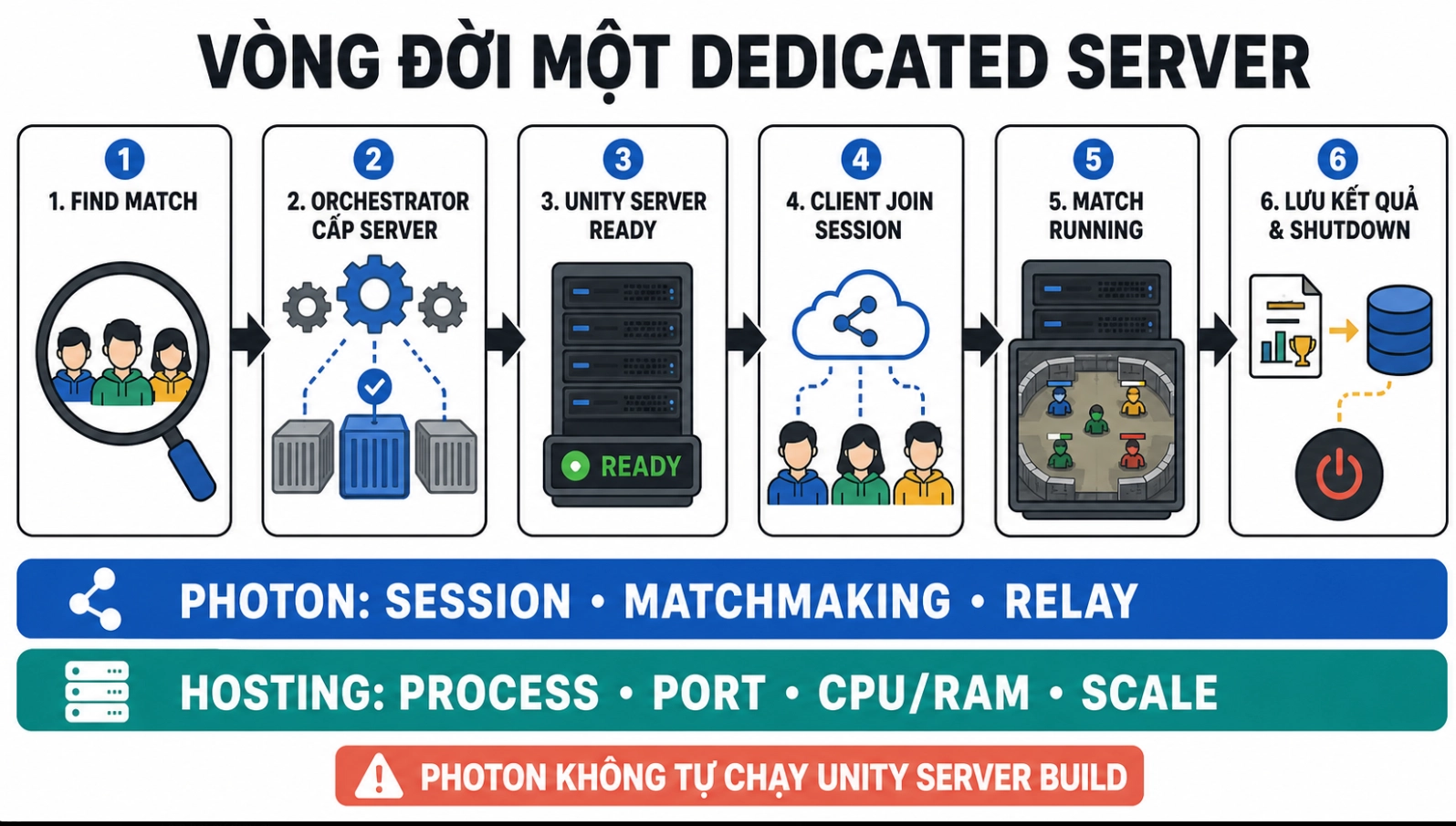 Basic headless run command:
./GameServer.x86_64 -batchmode -nographics -logFile server.lo
You can add custom parameters:
./GameServer.x86_64 \
  -batchmode \
  -nographics \
  -session ranked-1042 \
  -region asia \
  -port 27015
session,regionandportdo not automatically become Fusion configuration. Your bootstrap code must read and handle them.
What should the orchestrator do?
- Start/stop the process or container.
- Assign ports.
- Choose a region.
- Health checks and readiness.
- Collect log/metrics.
- Scale by match count.
- Shut down empty servers.
One process/container serving one match is an easy starting point to manage:
- Crashes are isolated.
- Easy to assign CPU/RAM.
- Easy to track the lifecycle.
- Easy to scale.
9. Security and performance
The server always validates
The server needs to check:
- Input size.
- Maximum speed.
- Cooldown and fire rate.
- Remaining ammo.
- Interaction distance.
- Line of sight.
- Alive/dead/stunned state.
- Item ownership.
RPC from the client is only a request, not an आदेश.
Authentication is different from authorization
- Authentication: “Who are you?”
- Authorization: “What are you allowed to do?”
A user with a valid login can still send fraudulent requests. The server must still validate gameplay.
Do not put database credentials, private keys, or backend secrets in the Unity client build.
Performance needs to be measured on a real server
Server cost usually comes from:
- Tick rate.
- Number of players.
- Number of
NetworkObject. - Physics and AI.
- Lag compensation.
- Network state size.
- Bandwidth snapshot.
Do not network everything. UI, local particle and decorative objects usually do not need replication.
For large maps, use Interest Management/Area of Interest so players only receive relevant objects.
Avoid allocation and continuous logging in FixedUpdateNetwork(). GC a spike on the server can cause many players to feel jitter at the same time.
10. Common mistakes
| Mistake | Correct way to think |
|---|---|
| The client sends position/damage finally | The client sends input, the server computes the result |
Gameplay runs in Update() | Simulation runs in FixedUpdateNetwork() |
Use Instantiate for network prefab | Use Runner.Spawn |
The client modifies itself [Networked] state | The client sends input/RPC, the server updates |
| Use RPC as long-term state | RPC causes changes [Networked] |
| Broadcast VFX/audio in re-simulation | Separate simulation from presentation |
| Restart a shutdown runner | Create NetworkRunner new |
| Thinking Photon will automatically open a Unity server | Use hosting/orchestrator |
| Only test localhost | Test latency, jitter, and packet loss |
| Client/server different config | Build from the same source and version |
11. Minimum checklist
- [ ] Server runs
GameMode.Server. - [ ] Client runs
GameMode.Client. - [ ] The server decides damage, inventory, score, and match result.
- [ ] The server spawns players and assigns Input Authority correctly.
- [ ] Gameplay runs in
FixedUpdateNetwork(). - [ ] Long-term state uses
[Networked]. - [ ] The server validates input and RPC.
- [ ] The scene manager is configured.
- [ ] Client/server use compatible config and version.
- [ ] The server build can run with
batchmode -nographics. - [ ] UDP port and public endpoint working.
- [ ] There are logs, health checks, and a shutdown flow.
- [ ] Latency, packet loss, and late join have been tested.
12. Short learning roadmap
Step 1: Host Mode
- Spawn two players.
- Synchronize movement.
- Create Health with
[Networked]. - Open doors with RPC and server validation.
Step 2: Server Mode
- Separate the server launcher and client launcher.
- Run one server build with two clients.
- Add command-line session/port.
Step 3: Production
- Lag compensation.
- Authentication.
- Interest Management.
- Containers and orchestration.
- Metrics and load testing.
Do not start with complex infrastructure when the player capsule has not even been spawned correctly by the server yet. Get authority and simulation right first.
Cheat sheet
| Question | Answer |
|---|---|
| Who decides the true state? | Dedicated Server |
| What does the client send? | Input or request |
| Where does gameplay logic run? | FixedUpdateNetwork() |
| What is used for long-term state? | [Networked] |
| What is used for immediate events? | RPC |
| Who spawns the player? | Server |
| What does the client use to control the avatar? | Input Authority |
| Does Photon run Unity gameplay? | No |
| Who hosts the Unity server build? | You or the hosting provider |
| Does Dedicated automatically block all cheats? | No, the server still has to validate |
Conclusion
Photon Fusion Dedicated Server is not just changing GameMode.Host to GameMode.Server.
The important thing is the way of thinking:
- The client does not own the truth.
- Input is not the result.
- The server enforces the game rules.
- Prediction makes the game smooth but does not give authority to the client.
- Input, RPC and
[Networked]solve three different needs. - Photon handles networking; hosting is still the product's responsibility.
When these six principles are correct, Fusion code will scale more easily and have far fewer state bugs.