Incremental GC is it the special cure that makes games stop stuttering?

Minh Khoa
Author
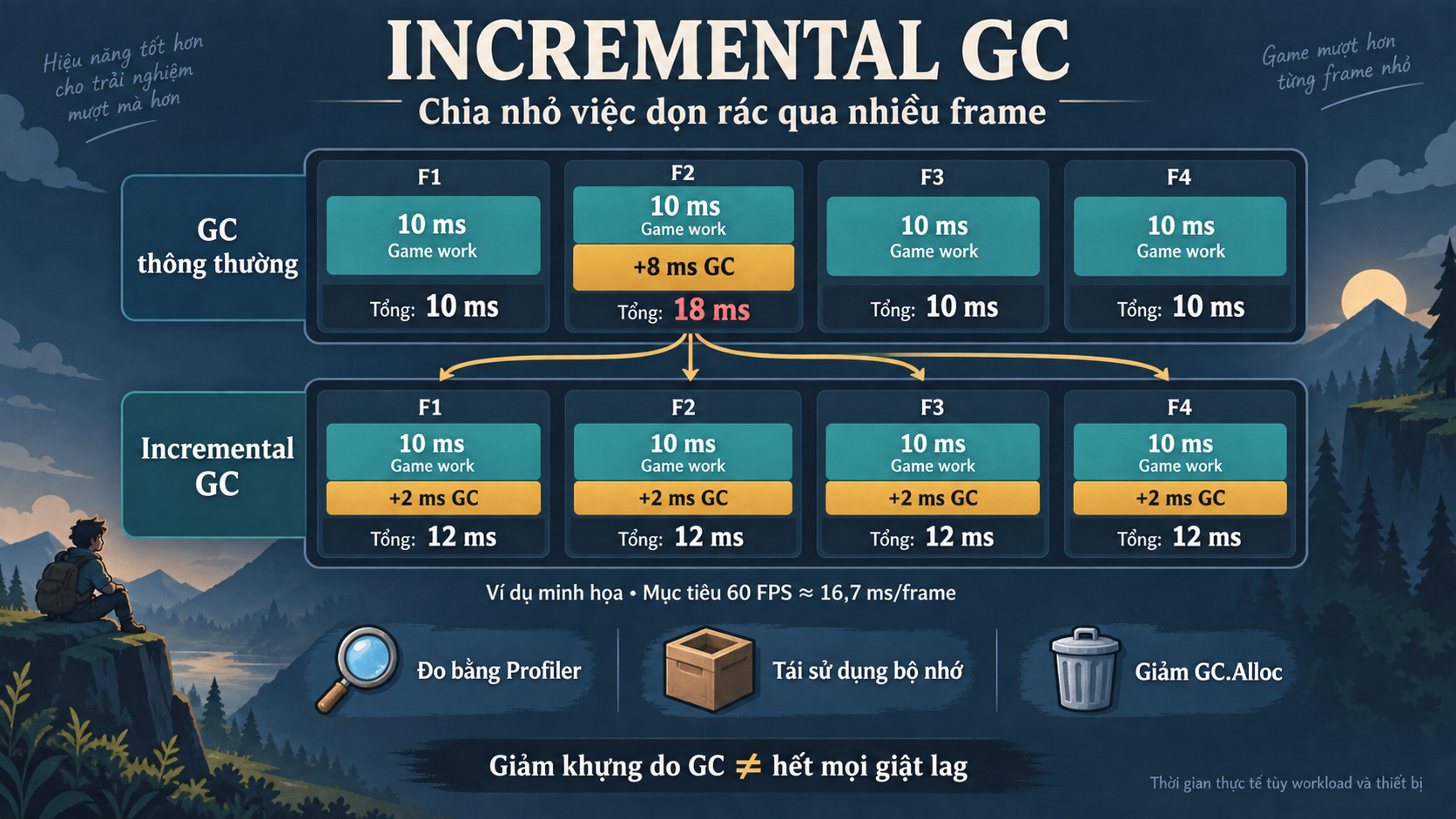 Games sometimes hitch for a moment. Opening the Profiler shows GC spikes, turning on Incremental GC and thinking: “Okay, fixed.”
But if the code keeps allocating temporary memory, the cleanup work is still there.
GC — The Garbage Collector — reclaims memory from objects C# that are no longer in use. Incremental GC helps spread this work across multiple frames, reducing long pauses. It still takes time CPU and does not handle hitches caused by GPUphysics, or asset loading.
A simple example
To maintain 60 FPS, each frame has about 16.7 ms.
Suppose the normal work takes 10 ms, and one GC needs another 8 ms:
Dọn dồn một lần:
10 ms → 18 ms → 10 ms → 10 ms
          ↑ Vượt ngân sách frame

Chia nhỏ công việc:
12 ms → 12 ms → 12 ms → 12 ms
These are illustrative numbers. In practice, GC there is no guarantee of even distribution or that it will take exactly 2–3 ms per frame. Unity can take advantage of the idle time at the end of a frame when using VSync or Application.targetFrameRate. Unity Manual
It’s on now, so why is it still hitching?
If a frame already takes 16 ms, adding a little more GC can still make it miss its deadline.
In addition, the game keeps changing objects while GC it is working. Unity uses write barrier to track reference changes, and may have to rescan related objects. If too many changes prevent the marking process from finishing, GC it may fall back to a full collection, non-incremental. Unity has officially described this mechanism. Unity Manual
A very easy place to generate garbage: updating UI every frame
void Update()
{
    scoreText.text = "Score: " + score;
}
The score hasn’t changed, but the code keeps creating strings.
The simple fix is to update only when the score changes:
public void AddScore(int amount)
{
    score += amount;
    scoreText.text = "Score: " + score;
}
There is still allocation when creating strings, but the number of times drops significantly. With the same mindset, I reuse Lists, buffers, and pools for frequently appearing objects. Unity recommends reducing repeated allocation to near 0 bytes per frame in frequently running sections. GC best practices
What about RAM of Unity?
GC does not move objects to gather empty spaces together. Therefore, turning on Incremental GC does not solve memory fragmentation.
However, saying “if the heap grows, it never shrinks” is too absolute. Unity can return free memory pages to the operating system on many platforms, but the timing is not guaranteed. Managed memory
Don’t rush to turn off GC during combat
Turning off GC means the memory of discarded objects has not yet been reclaimed. If combat still causes allocations, RAM continues to grow. And GC.Collect() is a blocking collection, which can itself cause hitches. This is a technique that needs measurement and control, not a default formula. Disabling GC
I’ll start with the Profiler on the target device: confirm whether the hitch is related GC or not, find repeated allocations, and then fix the source. Only after that will I consider adjusting the time slice.
Incremental GC is very useful. But turning it on does not replace understanding what each frame is allocating and why.