Moving to Addressables: don’t just replace Resources.Load

Minh Khoa
Author
 The original project had a few prefabs, put them in
 Resources and load them, and it just worked. Later, with skins, maps, events… the installer grew larger, and even wanting to update a bit of content meant releasing a new game version.
That is usually when I start thinking about Addressables.
But if you only replace Resources.Load with Addressables.LoadAssetAsyncand then force waiting for the result with WaitForCompletion()then the hardest part still has not been solved.
1. Each loading method solves a different problem
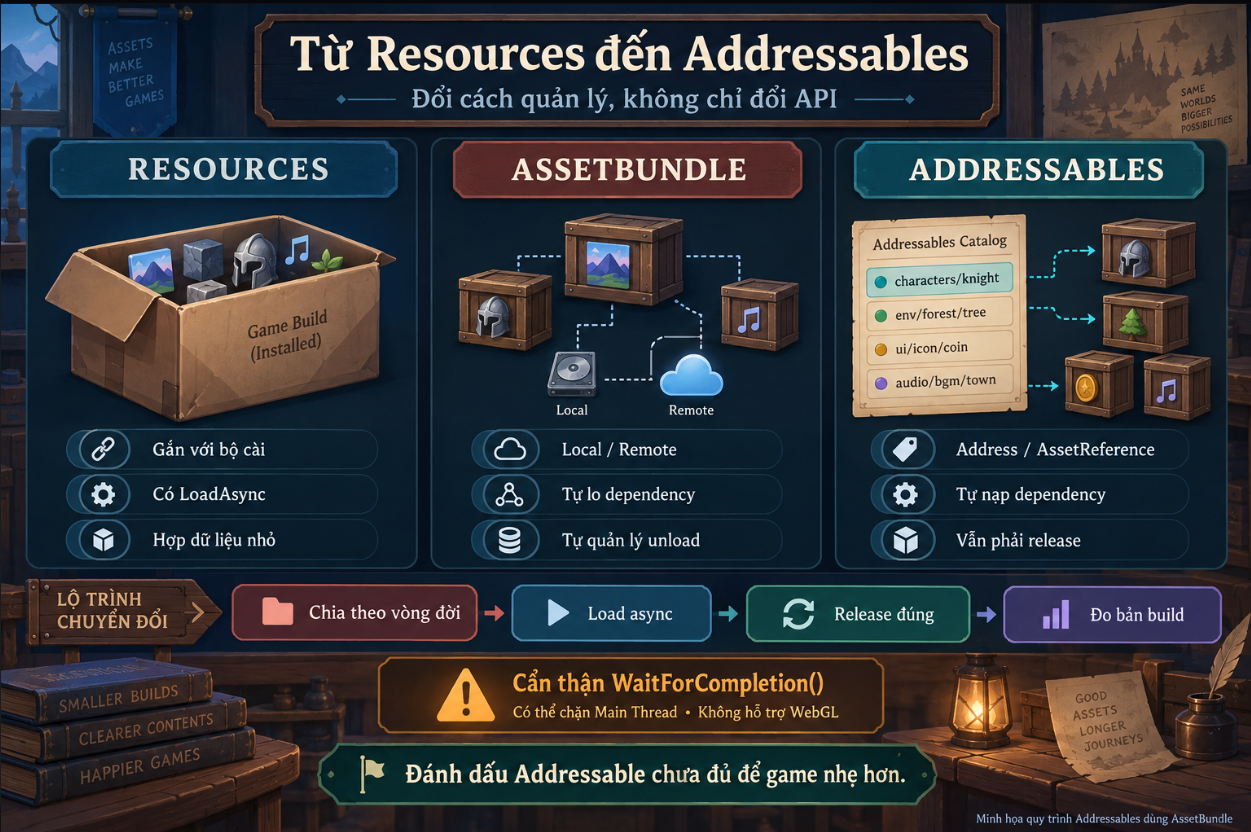
Resources is convenient because it requires little setup. In return, assets in this folder are included in the Player build even if nothing references them. When it contains too many objects, the index data also increases startup cost. Resources does not have a built-in mechanism for updating content from the server. Unity — Resources.
One point that needs to be made clear: Resources can LoadAsyncis not just about synchronous loading. Its biggest limitation lies in how content is packaged and distributed. Resources.LoadAsync.
AssetBundle allows content to be separated from the installer, placed locally or loaded remotely. But then I have to manage dependencies and the timing of unload.
For example, if a prefab in bundle A uses a material in bundle B: you need to make sure B has been loaded before loading the asset that needs it. It is not mandatory to open bundles in a fixed order. Unity — Dependencies.
Even unload needs to be understood correctly: Unload(false) keeps loaded assets, and does not immediately lose references that are in use. But reloading the bundle may create duplicate resources. And Unload(true) can break objects that are still using that asset. Unity — AssetBundle loading.
2. Addressables helps manage, it does not decide for me
With a workflow using AssetBundleAddressables sits above it to manage addresses, dependencies, and reference counts.
Code requests an asset via Address or AssetReference. The catalog helps the system know where to fetch content; I do not have to trace each dependent bundle myself. Unity — Addressables.
But you still have to decide:
-
Which assets need to be available immediately, and which should load later?
-
Who holds the handle and is responsible for releasing it?
-
Which assets should be packaged together?
As in the previous article: releasing Shop does not necessarily release the atlas if the bundle containing it is still held by HUD. A ref count dropping to 0 does not mean RAM it is reduced immediately. Unity — Memory management.
Therefore, splitting by usage lifetime is often more useful than putting everything into a single Group named “UI”. And you have to inspect the actual bundle, not just look at the Group name.
3. Don’t use WaitForCompletion to avoid changing the loading flow
Suppose opening Shop needs to load a prefab. The old code wants to receive the prefab immediately, so I call WaitForCompletion().
If the operation is not finished yet, the Main Thread has to wait. The loading animation may also freeze.
Unity also notes: with asset-loading operations, this call may cause the entire asset-load running operationto complete, WebGL not just the asset I just requested. Unity does not recommend using it when loading remote bundles; it does not support this waiting method..
Unity — Synchronous loading
A more appropriate flow is: UI Click Open Shop → show loading → if loading succeeds then open
→ if it fails, show an error or allow retry.
And you also need to handle the case where the player has already closed the screen before loading finishes: do not reopen Shop unintentionally or forget the handle just received.
-
Migrate piece by piece, measure piece by piece
-
I will start with an independent feature such as Shop:
-
Move the necessary assets to Addressables, redesign the asynchronous loading flow.
-
Clearly define where the handle is kept and when to release it. Analyze/Build Check for duplicated packaged resources across scenes, Resources, and Addressables with Layout. Marking something Addressable does not automatically remove every duplicate..
-
Unity — Analyze UI Test on a real build: open–close repeatedly, load failure, close
-
midway, and monitor memory. Once the local flow is stable, only then configure remote content and remote catalog if remote updates are needed..
Unity — Remote content
For a small game with a few fixed configs, Resources or Inspector references still have their place. There is no need to move everything just to have a “proper architecture”. API The value of Addressables lies in controlling when content is loaded, how long it is kept, and how it is updated. Migration of,