FixedUpdate If it runs stably, why not use it for all tasks?

Minh Khoa
Author
Summary:
FixedUpdate()stable in terms of the simulation timestep, not stable per rendered frame. Physics needs this rhythm; input, UI, camera, and visuals do not.
FixedUpdate() defaults to running with timestep 0.02s — equivalent to 50 physics steps per second. It sounds very even, very reliable, so why not put all game logic here?
The trick is in the word “stable.”
 ## ⏱️ 1. FixedUpdate stable in what?
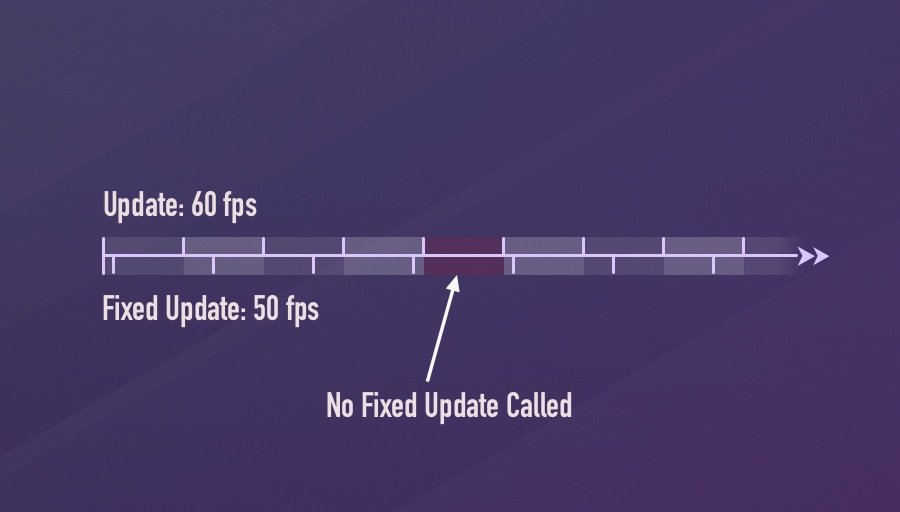
Unity keeps the amount of simulated time per step fixed. But the number of times FixedUpdate() in a render frame is not fixed:
- If the game runs faster than physics: a frame may have no
FixedUpdate(). - If the game runs slower: Unity may call
FixedUpdate()multiple times in a row in a frame to catch up.
Render 120 FPS, Physics 50 Hz:
Update:       U  U  U  U  U  U ...
FixedUpdate:  F     F     F     ...

Render 20 FPS, Physics 50 Hz:
Mỗi frame có thể phải chạy: F → F → Update
Imagine Update() is the camera taking one photo each frame, while FixedUpdate() is physics accounting closing the books every 20 ms. Sometimes the camera takes a shot before there is a new book; sometimes it has to close 2–3 books before the camera can take a shot.
👉 Stability for simulation does not mean smoothness to the human eye.
🛑 2. Why not use FixedUpdate for everything?
Input will respond late or be missed
Input happens according to the frame the player interacts on. With Legacy Input, events such as Input.GetButtonDown() are reset every frame, so Unity recommends reading them in Update().
If you only read them in FixedUpdate()a quick press may have to wait for the next physics tick. With the new Input System, you should still receive input with action/callback and then store it before applying it to the Rigidbody.
UI, camera, and animation can stutter
The screen is rendering 120 FPS but the logic in FixedUpdate() only changes 50 times per second. The result: many frames reuse the same state, appearing to stutter or lag.
Important Rigidbodies can enable Interpolation to smooth the visuals. But that is not a reason to move UI, camera, or visual animation into FixedUpdate().
The more the game lags, FixedUpdate the heavier it can get
When FPS drops, Unity has to run many physics steps to catch up. If you also stuff AI, pathfinding, UI and heavy logic into FixedUpdate()each slow frame has to bear the same pile of work many times over.
This is exactly the spiral:
Frame chậm → nhiều FixedUpdate → CPU nặng hơn → frame càng chậm
Unity calls this phenomenon the spiral of doom.
🎮 3. The right split: read input first, process physics later
using UnityEngine;

public class PlayerMover : MonoBehaviour
{
    [SerializeField] private Rigidbody rb;
    [SerializeField] private float moveForce = 20f;
    [SerializeField] private float jumpForce = 7f;

    private float moveInput;
    private bool jumpQueued;

    private void Update()
    {
        // Đọc input theo frame để phản hồi nhanh
        moveInput = Input.GetAxisRaw("Horizontal");

        if (Input.GetButtonDown("Jump"))
            jumpQueued = true;
    }

    private void FixedUpdate()
    {
        // Áp dụng kết quả lên hệ thống physics
        rb.AddForce(Vector3.right * moveInput * moveForce,
            ForceMode.Acceleration);

        if (jumpQueued)
        {
            rb.AddForce(Vector3.up * jumpForce, ForceMode.Impulse);
            jumpQueued = false;
        }
    }
}
The flow is very simple:
Update()listen to the player.- Input is stored, so there is no fear of missing a press.
FixedUpdate()use that data to control the Rigidbody.
💡 Do not multiply
Time.fixedDeltaTimebyAddForce(..., ForceMode.Force)just because the code is insideFixedUpdate(); the physics engine already integrates forces by timestep.
✅ 4. Rule of thumb
- Update: input, UI, timers with
Time.deltaTime, visual animation, movement that does not use physics. - FixedUpdate:
Rigidbody.AddForce, velocity,MovePositionand logic that truly belongs to the physics tick. - LateUpdate: camera follow after the character has moved.
- Custom tick: network simulation or gameplay simulation with its own rhythm.
Bottom line: Whatever needs to be correct with physics goes into
FixedUpdate. Whatever needs to be correct with the frame the player sees goes intoUpdateorLateUpdate.