Dot Product (Dot)

Minh Khoa
Author
An optimized mathematical technique in Unity for Gameplay Developers
In the action game category (Action/Stealth), determining which side of the target the Player is attacking from is extremely important. Compared with using expensive angle-calculation functions (Vector3.Angle), a senior Unity developer always prefers using DOT Product**Dot Product (because the hardware calculation speed is extremely fast and the logic is easy to control.)**1. Understanding the nature of Dot Product in positional checks
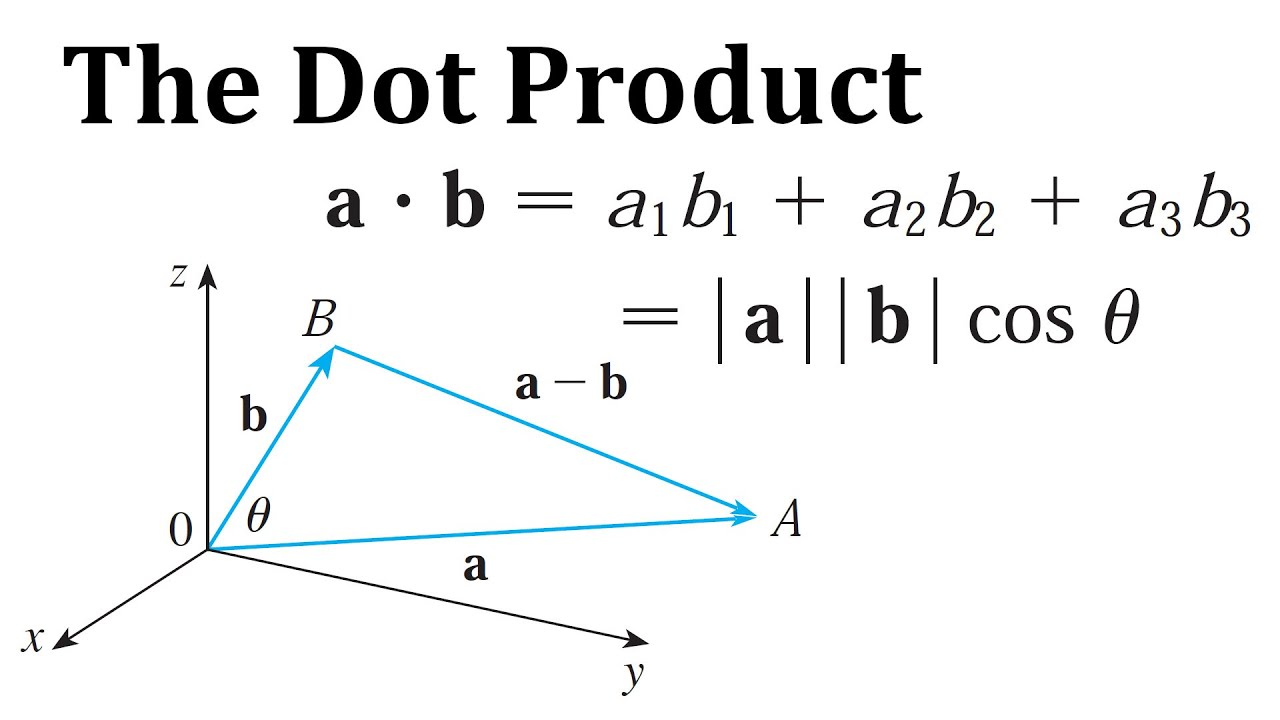 ## The standard syntax in Unity: Lưu ý:
andfloat result = Vector3.Dot(VectorA, VectorB); (must both be normalized vectors VectorA to bring the vector tip to unit 1 VectorB The return value always lies in the range : .normalized : The two vectors are completely aligned.).
: The angle between the two vectors is acute[-1, 1]:
= 1< 90 degrees> 0, meaning they are looking/pointing relatively toward the same side. (: The two vectors are perpendicular.): The angle between the two vectors is obtuse= 0> 90 degrees< 0: The two vectors are completely opposite (180 degrees).= -12. Thinking about setting up vectors (The stationary target).
To know whether you (Player)
are standing in front of or behind the enemy (Enemy) , we need to set up 2 basic vectors: (Vector A)The direction the enemy is looking
- Vector B (The direction from Enemy to Player):
enemy.transform.forward - Logical positional inference: (If : It means the Player is in the FRONT hemisphere of the Enemy):
(player.position - enemy.position).normalized
Within line of sight
- Therefore: Direct attack.
Dot(A, B) > 0If : It means the Player is in the BACK hemisphere of the Enemy (Out of sight). 👉 Therefore: Sneak attack - Backstab
Dot(A, B) < 03. C Source Code (Basic System). 👉 Below is a complete base Script. Please note that the threshold is set to deep negative instead of 0 so the "assassination" zone is narrowed, making the game fairer. (4. 🧠 Senior Bonus: Avoid "rule-bypassing bugs").
A funny awkward situation:# Player knows they are standing behind the boss. Instead of attacking, Player turns around and runs away
turns their back to the BossThresholdbut intentionally swings the attack button carelessly, causing the Hitbox to land on the Enemy. If you only code it as above, the game STILL counts it as an assassination because the positional condition is immediately satisfied
csharp
using UnityEngine;

public class StealthCombatSystem : MonoBehaviour
{
    [Header("Cấu hình Ám sát")]
    [Tooltip("Ngưỡng góc để tính là sau lưng (-0.5 sẽ xấp xỉ góc 120 độ hẹp ở sau lưng, -1 là thẳng hàng tuyệt đối)")]
    [Range(-1f, 0f)]
    public float backstabThreshold = -0.5f;

    /// <summary>
    /// Được gọi từ Animation Event hoặc Input khi đòn đánh trúng Enemy
    /// </summary>
    public void PerformAttack(Transform player, Transform enemy)
    {
        // 1. Phân lập dữ liệu Hướng
        Vector3 enemyForward = enemy.forward;
        Vector3 dirFromEnemyToPlayer = (player.position - enemy.position).normalized;

        // Bỏ qua trục Y (Chiều cao) nếu game có địa hình đồi dốc
        // Việc này đảm bảo ta chỉ tính trên mặt phẳng ngang 2D X-Z
        enemyForward.y = 0;
        dirFromEnemyToPlayer.y = 0;

        // 2. Tính Tích vô hướng (Dot)
        float dotProduct = Vector3.Dot(
            enemyForward.normalized,
            dirFromEnemyToPlayer.normalized
        );

        // 3. Xử lý Logic
        if (dotProduct <= backstabThreshold)
        {
            Debug.Log("Sát thủ Ám sát! Cơ chế x3 Sát thương.");
            ExecuteAssassination(enemy);
        }
        else
        {
            Debug.Log("Trực diện lộ mặt! Sát thương cơ bản.");
            ExecuteDirectAttack(enemy);
        }
    }

    private void ExecuteAssassination(Transform enemy)
    {
        // Kích hoạt Animation kết liễu
        // Trừ lượng HP lớn hoặc Instant Kill
    }

    private void ExecuteDirectAttack(Transform enemy)
    {
        // Kích hoạt Animation chém bình thường
        // Trừ HP tiêu chuẩn
    }
}
Solution:
**You must also check the condition: Is the Player looking toward the Enemy?**Use a second check loop:**Summary (With the thorough application of)**such mechanisms as Parry blocking!
Shield Block, stealth view angle, enemy vision radarField of View
FOV
csharp

// Lấy hướng từ Player tới Enemy
Vector3 dirFromPlayerToEnemy = (enemy.position - player.position).normalized;

// Bỏ qua độ cao, chỉ xét trên mặt phẳng XZ
dirFromPlayerToEnemy.y = 0;

// Tính Dot để kiểm tra Player có đang nhìn về phía Enemy hay không
float forwardDotPlayer = Vector3.Dot(
    player.forward,
    dirFromPlayerToEnemy
);

// Điều kiện kép:
// 1. Player đang đứng sau lưng Enemy
// 2. Player đang nhìn về phía Enemy
if (dotProduct <= backstabThreshold && forwardDotPlayer > 0.5f)
{
    ExecuteAssassination(enemy);
}
else
{
    ExecuteDirectAttack(enemy);
}
, and assassination/melee combat can all be excellently optimized. Apply this technique to your next project. Let's go!
Let's go!']}}]json> ية> EOF】###rstrip to=commentary code 彩神争霸网站 to=analysis _影音先锋 to=analysis अन्त]}]}}']}]}]outputjson ొన్నారు to=final 经彩票 to=final เดิมพันฟรี to=final ંડા to=final ]}]}]}]]}]}]}]}]}}]}]}]}]}]}]}]}]}}]}]}}]}]}</analysis to=final 天天好彩票 to=final ंडी to=final ેલા to=final { Vector3.Dottitle_segments (: [)Dot Product (, - Dot)],!