Distinguishing API Gateway, Load Balancer, and Reverse Proxy

Minh Khoa
Author
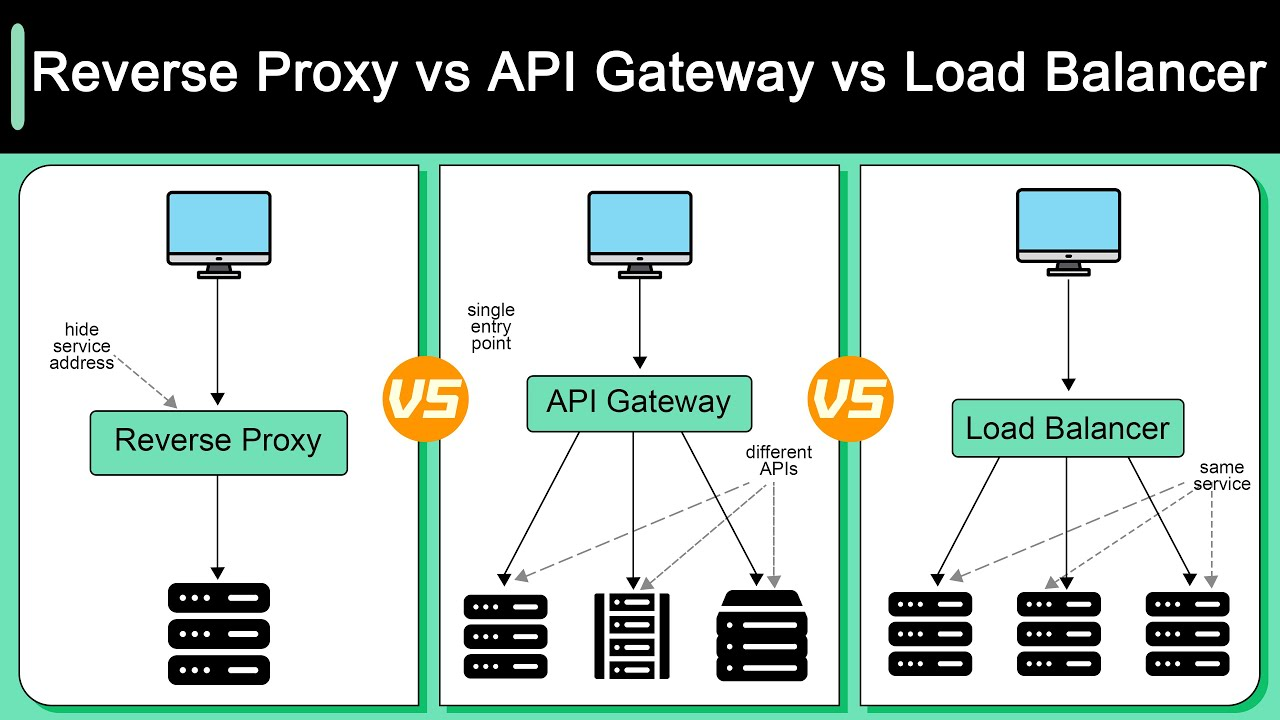
Hi everyone, when first learning backend architecture, these 3 concepts are often very easy to confuse, because in general all 3 stand in the middle as a bridge for Client (front-end, mobile) and Server (backend). But in essence, their purpose and how they work are quite different. This article will go into each one in detail.
 ---
---
1. Reverse Proxy (The gatekeeper at the gate)
1.1. Concept
- Normally, you use Proxy (or VPN) to change your IP while browsing the web, right? That is called Forward Proxy — it stands in for the Client (user) to communicate with the Internet.
- As for Reverse Proxy , it is the complete opposite - it stands in for the Server (backend system). Any request from the user first runs into the Reverse Proxy and they will never know where the real backend is located.
1.2. Detailed operating mechanism
- The Client sends a request to the domain
api.myapp.com. - DNS the domain resolves to the IP of the Reverse Proxy machine (not the IP of the real backend server).
- The Reverse Proxy receives the request, analyzes it header/URL, then decides which internal backend server to forward that request to (for example
192.168.1.10:3000). - The backend server finishes processing and returns the result to the Reverse Proxy.
- The Reverse Proxy receives the result, can compress it (gzip/brotli), add security headers, then send it back to the Client.
Throughout this process, the Client has no idea who the real backend server is, or which IP it is on.
1.3. Important technical functions
a) SSL/TLS Termination (Encryption termination)
- Encryption/decryption HTTPS is very costly CPU. If you have 10 backend servers, you would have to manage SSL certificates on all 10 of them, which is very troublesome.
- Solution: Place SSL a single certificate on the Reverse Proxy machine. At this point, communication from Client ↔ Reverse Proxy is HTTPS (encrypted), while from Reverse Proxy ↔ internal Backend only HTTP plain (unencrypted) is needed
- because they are both in the private network.SSL Note: This approach is called " (Termination". If you need a higher level of security) for example, finance or healthcareSSL then use "SSL Re-encryptionPassthrough" or "
" — that is, the entire internal segment is still encrypted.) b (Caching)
- Caching (The Reverse Proxy stores responses for common requests CSSespecially static files: images, HTML, JS,).
- , video
- When an identical request comes in, it returns the result from cache immediately without needing to call the backend, which significantly reduces load.
location /static/ {
    proxy_cache my_cache;
    proxy_cache_valid 200 302 60m;   # Cache response 200/302 trong 60 phút
    proxy_cache_valid 404 1m;        # Cache response 404 chỉ 1 phút
    proxy_pass http://backend_server;
}
Example Nginx configuration:) c (WAF)
- Security Headers & Web Application Firewall HTTP The Reverse Proxy can add security headers to the response before returning it to the Client:
X-Frame-Options: DENY— protect against clickjackingX-Content-Type-Options: nosniff— protect against MIME sniffingContent-Security-Policy— control which resource origins are allowed to loadStrict-Transport-Security (HSTS)— force the browser to only use HTTPS
- Some Reverse Proxies (or combined with modules) also act as WAF, filtering out requests with signs of attack SQL injection, XSS...
d) Compression (Data compression)
- Automatically compress responses with gzip or brotli before sending them to the Client.
- Significantly reduces the size of data transmitted over the network (directly affecting page load speed and bandwidth costs).
e) URL Rewriting
- Allows rewriting URL before forwarding to the backend. For example, if you want the path
/v2/usersoutside to be mapped to/api/usersinside the backend.
1.4. Common tools
ToolFeatureNginxThe most common, lightweight, fast, configured with text files. Huge community.Apache HTTP Server (mod_proxy)Long-standing, many extension modules, but consumes RAM more than Nginx under high load.CaddyAutomatically requests and renews SSL certificate (Let's Encrypt). Extremely simple configuration.EnvoyBuilt for the era of Cloud-native/Microservices. Supports HTTP/2, gRPC, good observability.CloudflareReverse Proxy service in the form of SaaS (no need to install yourself). Also has built-in CDN, DDoS protection.
2. Load Balancer - LB (The task divider)
2.1. Concept
- When an application has many users, one server cannot handle everything. You need to run multiple copies (instance/replica) of the backend server.
- The Load Balancer sits in the middle, receives all incoming traffic, and distributes evenly to the servers behind it, ensuring no server is overloaded while another is idle.
2.2. Classified by operating layer (OSI Model)
a) Layer 4 Load Balancer (Transport layer — TCP/UDP)
- Operates at a low network layer. It only looks at the source/destination IP information and port, then decides which server to send the packet to.
- Cannot read the content HTTP (does not know URL what it is, what the header is like).
- Advantage: Extremely fast, overhead is almost zero because it does not need to decode the content.
- Disadvantage: "Blind" to content, cannot route by URL or cookie.
- Real-world example: AWS NLB (Network Load Balancer), HAProxy (mode TCP mode).
b) Layer 7 Load Balancer (Application layer — HTTP/HTTPS)
- Operates at the application layer. It can read the entire content HTTP: URL path, header, cookie, body.
- Can do intelligent routing: for example, requests with URL
/api/images/*are sent to the image-processing server cluster, while/api/users/*are sent to the user server cluster. - Advantage: Flexible, accurate routing based on content.
- Disadvantage: Slower L4 a bit because it has to read and analyze the content HTTP.
- Real-world example: AWS ALB (Application Load Balancer), Nginx, HAProxy (HTTP mode).
2.3. Detailed load balancing algorithms
AlgorithmsHow it worksWhen to useRound RobinRound-robin distribution: S1 → S2 → S3 → S1...When the servers have the same hardware configuration.Weighted Round RobinSimilar to Round Robin, but the stronger server is assigned a higher weight (receives more requests). For example S1 (weight=3) receives 3 requests, S2 (weight=1) receives 1 request.Khi the servers have different configurations.Least ConnectionsSends the request to the server that is currently handling the fewest active connections.When requests have very different processing times (for example API large file uploads interleaved with API light data reads).Weighted Least ConnectionsCombines Least Connections + weight server.Khi different server configurations + requests with different loads.IP HashHashes the Client IP to determine the server. The same IP is always routed to the same 1 server.Khi need to keep session (sticky session) without wanting to use an external session store.Least Response TimeSends the request to the server with the lowest average response time.When you want to optimize the user experience, prioritize the fastest-responding server.RandomSelects 1 server at random.Simple, rarely used in serious production.
2.4. Health Check (Server health check)
- The Load Balancer continuously sends check signals (ping) to the backend servers to know whether they are still alive.
- There are 2 types:
- Active Health Check: LB actively sends periodic check requests (for example, every 5 seconds calls
GET /healthto the backend; if the response is 200 then OK, if it times out or returns 500 then mark that server as "down"). - Passive Health Check: LB monitors real requests from users. If it sees 1 server continuously returning errors 502/503 then automatically considers that server as "down".
- Active Health Check: LB actively sends periodic check requests (for example, every 5 seconds calls
- When a server is marked "down", LB will stop sending traffic to that server. When that server recovers (health check returns OK), LB automatically puts it back into the serving list.
2.5. Session Persistence (Sticky Session)
- Problem: If user A sends request 1 to Server 1, then request 2 is sent by the LB to Server 2, then the login session on Server 1 will be lost.
- Solution 1 - Sticky Session: Use cookies or IP Hash to ensure the same 1 user is always routed to the same 1 server. Drawback: if that server dies, the user loses the session.
- Solution 2 - External Session Store (better): Store the session in a shared place such as Redis, Memcached, or a Database. All servers read/write the session in the same place. The user can be routed to any server without losing the session.
2.6. Popular tools
ToolsFeaturesHAProxyOpen source, high performance, supports both L4 and L7. Very popular on Linux servers.NginxActs as both a Reverse Proxy and a LB. Easy-to-understand configuration.AWS ELBManaged service of AWS, includes 3 types: ALB (L7), NLB (L4), GLB (Gateway LB). No need to manage servers yourself.Google Cloud Load BalancingSimilar AWS, managed, global scale.TraefikAutomatically discovers new services (used a lot with Docker/Kubernetes).
3. API Gateway (Building lobby receptionist)
3.1. Concept
- When a system moves from Monolith architecture to Microservices (breaking the app into dozens of separate services: User Service, Order Service, Payment Service, Notification Service...)will create 2 major problems:
- The client must know the address of each service → messy, hard to maintain.
- Each service must self-implement security logic, rate limiting, logging → duplicated code, error-prone.
- API Gateway solves both of the above problems by creating a single entry point (Single Entry Point) for the entire system. The client only needs to know 1 single address, everything behind it is handled by the Gateway.
3.2. Detailed operating mechanism
- Client sends request to
https://api.myapp.com/orders/123. - API Gateway receives the request, performs a sequence of checks in order (called Request Pipeline):
- Step 1: Rate Limit check → has this user exceeded the limit?
- Step 2: Authentication → is the token JWT valid? Has it expired?
- Step 3: Authorization → does this user have permission to access the resource
/orders/123? - Step 4: Request Transformation → modify headers, add internal metadata, validate the body.
- Step 5: Routing → the path
/orders/*matches the rule to forward to Order Service.
- API Gateway forwards the request to
order-service:8080/orders/123. - Order Service processes it and returns the result to API Gateway.
- API Gateway performs the Response Pipeline: adds CORS headers, logs the response, transforms the data format if needed, then returns the response to the Client.
3.3. Important technical functions
a) Authentication & Authorization (Authentication & Authorization)
- Gateway checks the validity of JWT token, API Key, OAuth2 access token.
- Supports multiple authentication methods: JWT, OAuth2, Basic Auth, HMAC, mTLS (mutual TLS).
- After authentication, the Gateway can inject user information into the header (
X-User-ID,X-User-Role) so downstream services can use it without having to decode the token themselves.
b) Rate Limiting & Throttling (Limit request rate)
- Apply limits across multiple dimensions:
- By user: "User A is only allowed to call 100 request/phrequests".
- By API endpoint: "Endpoint
/api/loginonly allows 10 request/phrequests/IP". - By plan/tier: "Users on the Free plan are limited to 1000 req/ngper day, Premium plan limited to 100000 req/ngper day".
- Common Rate Limiting algorithms:
- Token Bucket: Each user has a bucket containing tokens. Each request consumes 1 token. Tokens are replenished steadily over time. When tokens run out, it is blocked.
- Sliding Window: Count the number of requests in a sliding time window.
- Fixed Window: Count the number of requests in a fixed time window (for example reset to 0 every minute).
c) Request/Response Transformation (Data transformation)
- Change headers, body, query params before forwarding to the backend.
- Real-world example: The client sends JSON, but the old backend only understands XML → the Gateway can convert the format.
- Or the backend returns 20 data fields but the mobile client only needs 5 fields → the Gateway filters the response to make it lighter.
d) API Composition / Aggregation (Combine API)
- This is the most powerful and distinctive feature compared to Reverse Proxy and LB.
- Example: The client needs to display the "Order details" page including order information + user information + payment status. Instead of forcing the client to make 3 API separate calls (takes 3 round-trip), Gateway can automatically call 3 internal services in parallel, aggregate the results into a single response, and then return it → greatly reducing latency for the Client.
e) Circuit Breaker (Circuit breaker)
- When an internal service goes down or responds too slowly, the Gateway temporarily cuts off connections to that service (doesn't call it anymore). After a period of time (for example 30 seconds), it tries calling again to see whether the service has recovered.
- Purpose: Avoid the domino effect — one service going down drags the entire system down because all requests get stuck waiting at that down service.
- This pattern is inspired by the circuit breaker in a house: when there is a problem, it cuts the circuit to protect the entire system.
g) Service Discovery (Self-discovering services)
- In container environments (Docker, Kubernetes), the IPs of services change continuously (a killed container and then recreated one will have a new IP).
- API The Gateway can integrate with Service Discovery systems (such as Consul, Eureka, Kubernetes DNS) to automatically know which service is running where without needing hardcoded IP configuration.
g) Logging, Monitoring & Analytics
- The Gateway is the only point that every request passes through, so it is a very ideal place to:
- Centralized logging (centralized logging).
- Measure latency, error rate, request count for each API.
- Tracing — attach a Trace ID to each request to track how many services it passes through.
- Export metrics to Grafana, Prometheus, Datadog...
h) API Versioning (Version management API)
- When you need to release API a new one without wanting to break the old app: the Gateway can route
/v1/usersto the old service,/v2/usersto the new service. - Or use the header
Accept-Version: v2to determine the version.
3.4. Advanced patterns
a) BFF Pattern (Backend For Frontend)
- Instead of using one API Gateway for all client types, people create multiple separate Gateways:
- Gateway for Mobile (returns lightweight data, fewer fields, compressed images).
- Gateway for Web (returns full data, supports SSR).
- Gateway for IoT/Thiembedded devices (different protocols, minimal data).
- Each of these Gateways is optimized separately for the corresponding client type.
b) Sidecar / Service Mesh
- In extremely large systems, instead of putting all logic into one API central Gateway (easy to become a bottleneck - bottleneck), you can use the Service Mesh (for example Istio, Linkerd).
- Each service will be attached with one small proxy (called Sidecar, usually Envoy), this Sidecar handles all security, routing, retry, circuit breaker at the per-service level. The central Gateway now only handles initial authentication and outer-layer routing.
3.5. Common tools
ToolFeaturesKongOpen source, based on Nginx + Lua. The plugin ecosystem is very rich. Managed via Admin API or dashboard.AWS API GatewayManaged service of AWS. Deep integration with Lambda, IAM, Cognito. Charges based on request count.TraefikAutomatically discovers services from Docker/Kubernetes. Configured with labels, very convenient for cloud-native.Apigee (Google)Enterprise-grade, strong in analytics, developer portal, API monetization.OcelotDedicated to the .NET ecosystem. Lightweight, easy to integrate into a project ASP.NET Core.KrakenDHigh performance, stateless (no database), configured by JSON/YAML.TykOpen source, written in Go, supports GraphQL gateway.
4. Detailed comparison: similarities and differences
4.1. Similarities
- All 3 are in between (Middle-man) acting as intermediaries between the Client and the Backend Server.
- All 3 receive requests from the Client and forward (forward/proxy) them elsewhere.
- All 3 can help anonymize the backend — the Client does not know exactly where the real server is.
- All 3 can operate at Layer 7 (HTTP/HTTPS).
- Many tools can take on all 3 roles at once (Nginx, Traefik, Envoy...). This is exactly the most confusing reason.
4.2. Core differences
CriteriaReverse ProxyLoad BalancerAPI GatewayMain purposeAnonymize the server, security, SSL termination, static content caching.Distribute traffic evenly to a group of identical servers to handle high load.Manage the entire lifecycle API: authentication, authorization, rate limiting, routing to the correct microservice.Operating layer (OSI)Layer 7 (Application).Layer 4 (TCP/UDP) or Layer 7 (HTTP).Always at Layer 7 (Application). Understands application logic in depth.Read/modify request content?Limits (compression, add basic headers).L4: No. L7: Can read but rarely modifies.Yes. Deeply reads, validates, transforms the body, aggregates responses from multiple services.Knows about many different types of backend services?Usually only knows one group of servers.Knows one group of identical servers (running the same app).Knows many different groups of services (User, Order, Payment...) and routes to the right group.AuthenticationNo (or very basic).No.Yes — JWT, OAuth2, API Key...Rate LimitingCan be configured at a basic level.No.Yes — detailed by user, endpoint, plan.Circuit BreakerNo.No (only Health Check).Yes.API AggregationNo.No.Yes — combines many API into one response.Operational complexity levelLow.Medium.High (needs plugin, policy, monitoring management).
4.3. Easy way to distinguish
- Reverse Proxy → answers the question: "How do we hide and protect the backend?"
- Load Balancer → answers the question: "How do we distribute the work evenly when there are too many users?"
- API Gateway → answers the question: "How do we manage, control, and coordinate dozens of microservices in an organized way?"
5. The big picture when combining all 3
If you look at large systems in production, they often combine all 3 components into a multilayer architecture:
                             ┌───────────────────────────────────┐
                             │          CDN / Edge Layer         │
                             │  (Cloudflare, AWS CloudFront)     │
                             │  Cache static content, DDoS       │
                             └────────────────┬──────────────────┘
                                              │
                             ┌────────────────▼──────────────────┐
                             │    Global Load Balancer (L4)      │
                             │  (AWS NLB, Google Cloud LB)       │
                             │  Phân tải TCP/IP cực nhanh        │
                             └───────┬───────────────┬───────────┘
                                     │               │
                          ┌──────────▼─────┐  ┌──────▼──────────┐
                          │  API Gateway   │  │  API Gateway    │
                          │  Instance 1    │  │  Instance 2     │
                          │  (Kong/Traefik)│  │  (Kong/Traefik) │
                          │  Auth, Rate    │  │  Auth, Rate     │
                          │  Limit, Route  │  │  Limit, Route   │
                          └──┬────┬────┬───┘  └──┬────┬────┬────┘
                             │    │    │          │    │    │
              ┌──────────────▼┐ ┌─▼──┐ ┌▼────┐   │    │    │
              │ User Service  │ │Order│ │Pay- │   │    │    │
              │ (3 replicas)  │ │Svc  │ │ment │   ...  ...  ...
              │ + Internal LB │ │     │ │Svc  │
              └───────────────┘ └─────┘ └─────┘
Request flow through the system:
- CDN / Edge Layer: If the request is a static file (image, CSSJS), CDN return it directly from the nearest edge server. If it is a API request, forward it downward.
- Global Load Balancer (L4): Accepts connections TCP, distributes them evenly across multiple instances API Gateway.
- API Gateway: Checks the token, rate limit, and routes to the correct microservice.
- Microservices: Each service may have its own internal LB to balance load across its own replicas.
6. Real-world scenarios and choices
ScenarioWhat should be used?ExplanationSmall web app, 1 backend server, wants to have HTTPSReverse Proxy (Nginx or Caddy)Only need to hide the IP, add SSL, can add caching. No need for LB yet or Gateway.Web medium app, traffic grows, need to run multiple backend instancesReverse Proxy + Load Balancer (Nginx upstream configuration)Nginx serves as both Reverse Proxy and LB. One tool solves 2 problems.Microservices system, many teams, many different servicesLoad Balancer + API GatewayLB distributes load at the outer layer, API Gateway manages routing, auth, and rate limit for each service.Large system, needs to handle global load, many types of Client (mobile, web, IoT)CDN + LB + API Gateway (multiple instances) + Internal LBA full multilayer architecture like the diagram above.
7. Notes when deploying in practice
- API Gateway is a Single Point of Failure (SPOF): If you only run 1 Gateway instance and it dies, the entire system loses connectivity. You should always run at least 2 Gateway instances and place 1 LB in front of them.
- Do not stuff too much logic into the Gateway: Gateway should do things like cross-cutting (authentication, rate limit, logging). Do not put business logic here because it will become a new monolith.
- Be careful with caching: If the cache is wrong, users receive old data (stale data), especially dangerous with payment data and carts. You should only cache data that changes infrequently (product lists, images, static files).
- Health Check must test the right thing: Do not just check whether the server returns 200 OK. You should also verify database connections, Redis, disk space... (called Deep Health Check).
- Observability: When the system is complex with many layers, debugging will be very difficult without Distributed Tracing (for example Jaeger, Zipkin). Attach a Trace ID to each request from the Gateway layer so that when there is an error, everyone knows which services that request passed through.
Mastering the essence of this trio will make you more confident when designing backend infrastructure, whether it is a small project or a large-scale system.