Why do mobile apps often use ASTC 6x6 instead of 4x4 or 8x8?

Minh Khoa
Author
There is a very short answer:
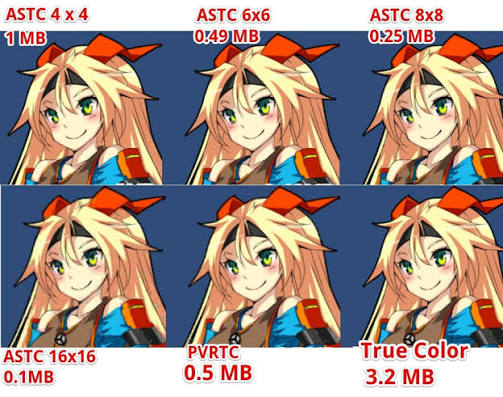
ASTC 6x6 is not the prettiest and it is not the lightest either. It is used a lot because it is good enough for most assets, while being much lighter than 4x4.
In other words, 6x6 is a safe starting point, not the correct answer for every Texture.
 ---
---
1. A lightweight PNG file does not necessarily mean a lightweight Texture in the game
File PNG 300 KB is only a source file in the Project.
When the game runs, GPU a different format is used for rendering. On mobile, that format is often ASTC if the device supports it.
Simply put:
PNG/JPG     → dùng để lưu và nhập vào Unity
ASTC        → dạng GPU đọc khi game đang chạy
So, do not look only at the PNG file size. Look at the format and the memory of the Texture after the build.
2. How are 4x4, 6x6, and 8x8 different?
ASTC splits the image into blocks for compression.
Imagine each block is served the same cake:
4x4: fewer pixels sharing the cake → the image looks better but is heavier.6x6: a moderate number of pixels → a balance between quality and size.8x8: many pixels sharing the cake → lighter, but details are more likely to become flat and smeared.
For a Texture 1024 × 1024, without considering mipmap:
| Format | Approximate memory | It should be understood as |
|---|---|---|
| --- | ---: | --- |
| ASTC 4x4 | 1.00 MB | The prettiest, but heavy |
| ASTC 6x6 | 0.45 MB | Balanced |
| ASTC 8x8 | 0.25 MB | Light, but easily ugly |
For one image, the difference is not large. But a game has dozens of Atlases, Character, UIBackground and VFX then the numbers will add up very quickly.
3. Why is 6x6 often chosen?
Because 6x6 it sits right between two issues:
4x4 → nhìn đẹp, nhưng tốn hơn 6x6 trên 2 lần memory
6x6 → vẫn đủ sạch với đa số asset
8x8 → nhẹ hơn, nhưng dễ lộ lỗi ở viền và chi tiết nhỏ
When starting optimization, we do not have time to sit down and choose a format for each image. Using 6x6 as the default makes the Project noticeably lighter with little risk of making the image look bad right away.
6x6 is a safe default. Only assets that truly need it are then increased or reduced in quality.
4. Quick selection by image type
Text, font, cạnh rất sắc
→ ASTC 4x4 hoặc 5x5

Icon lớn, mặt nhân vật, UI quan trọng
→ Bắt đầu 5x5; nếu vẫn đẹp thì thử 6x6

Gameplay Sprite và Texture thông thường
→ Bắt đầu 6x6

Background mềm, khói, glow, VFX mờ, vật ở xa
→ Thử 8x8
If 6x6 makes the border dirty or text blurry, increase it to 5x5. If switching to 8x8 and during actual play you cannot see any difference, just use 8x8 to save memory.
No need to be loyal to one mode for the entire game.
5. Three things more important than choosing 6x6 or 8x8
Max Size
Texture 2048 × 2048 has 4 times as many pixels 1024 × 1024.
If the image is only displayed small on the phone, reducing Max Size is often more effective than trying to compress it very hard.
Mipmap
Mipmaps make the Texture increase by about 33% in size on disk and in memory.
- UI Screen Space is not scaled down: usually off.
- 3D Texture or Sprite with a camera that zooms far out: usually needed.
Does the device support it ASTC ?
Most modern Android devices and iPhone from A8 up support ASTC. But older Android devices may not support it; Unity has to decompress the Texture into RGBA32which causes memory to increase sharply.
If you still support old devices, use Texture Compression Targeting or prepare a ETC2 fallback.
6. The simplest workflow
Bước 1: Set ASTC 6x6 làm điểm bắt đầu.

Bước 2: Giảm Max Size nếu Texture lớn hơn nhu cầu hiển thị.

Bước 3: Build lên thiết bị thật.

Bước 4:
- Chữ, icon, nhân vật bị xấu → đổi 5x5 hoặc 4x4.
- Background, VFX vẫn đẹp → thử 8x8.

Bước 5: Kiểm tra lại bằng Memory Profiler.
Do not zoom the image to 800% in the Inspector and then draw conclusions. Players see the Texture in gameplay, on the phone screen, and at its actual size.
Summary in one sentence
ASTC 6x6 is used a lot on mobile because it is the practical balance point: much lighter than 4x4, but less likely to ruin the image than 8x8. Use it as the default, then increase quality for important assets and compress more aggressively for less noticeable assets.