Unity••10 min•123 views••
Lifecycle of GameObject

Minh Khoa
Author
1. Basics: The basic lifecycle of a GameObject + MonoBehaviour
When a GameObject is created in the Scene and attached with a script MonoBehaviourit goes through a lifecycle sequence:
1.1 Creation and activation
- Awake()
- Called only once when the script is loaded (before the scene even starts).
- Used for: initializing variables, setting up references (for example:
GetComponent, loading config). - Even if
GameObjectit is disabled,Awakeit is still called.
- OnEnable()
- Called whenever GameObject or the component is enabled.
- If you disable and then enable it again,
OnEnable()it will run again. - Used for: registering events, resetting temporary state.
1.2 Lifecycle at runtime
- Start()
- Called before the first Update framebut after Awake and OnEnable.
- Used for: executing logic that requires fully initialized data.
- If GameObject it is disabled on the first frame then
Startit will wait until it is enabled.
- Update()
- Called every frame, depending FPS.
- Used for: gameplay logic (input checking, AIanimation state).
- LateUpdate()
- Called after all
Update()in that frame. - Used for: handling “follow-up” (camera follow, syncing the transform after the character has moved).
- Called after all
- FixedUpdate()
- Called at a fixed frequency (default 0.02s, i.e. 50 times/second).
- Used for: physics (Rigidbody, Force, Collider).
- If you want stable physics in your game → code that moves the rigidbody should be placed here.
1.3 End of lifecycle
- OnDisable()
- Called when GameObject or the component is disabled.
- Used for: unregistering events, clearing state, avoiding memory leaks.
- OnDestroy()
- Called when GameObject is Destroyed or the scene is unloaded.
- Used for: releasing resources, saving state.
2. Advanced execution order (Script Execution Order)
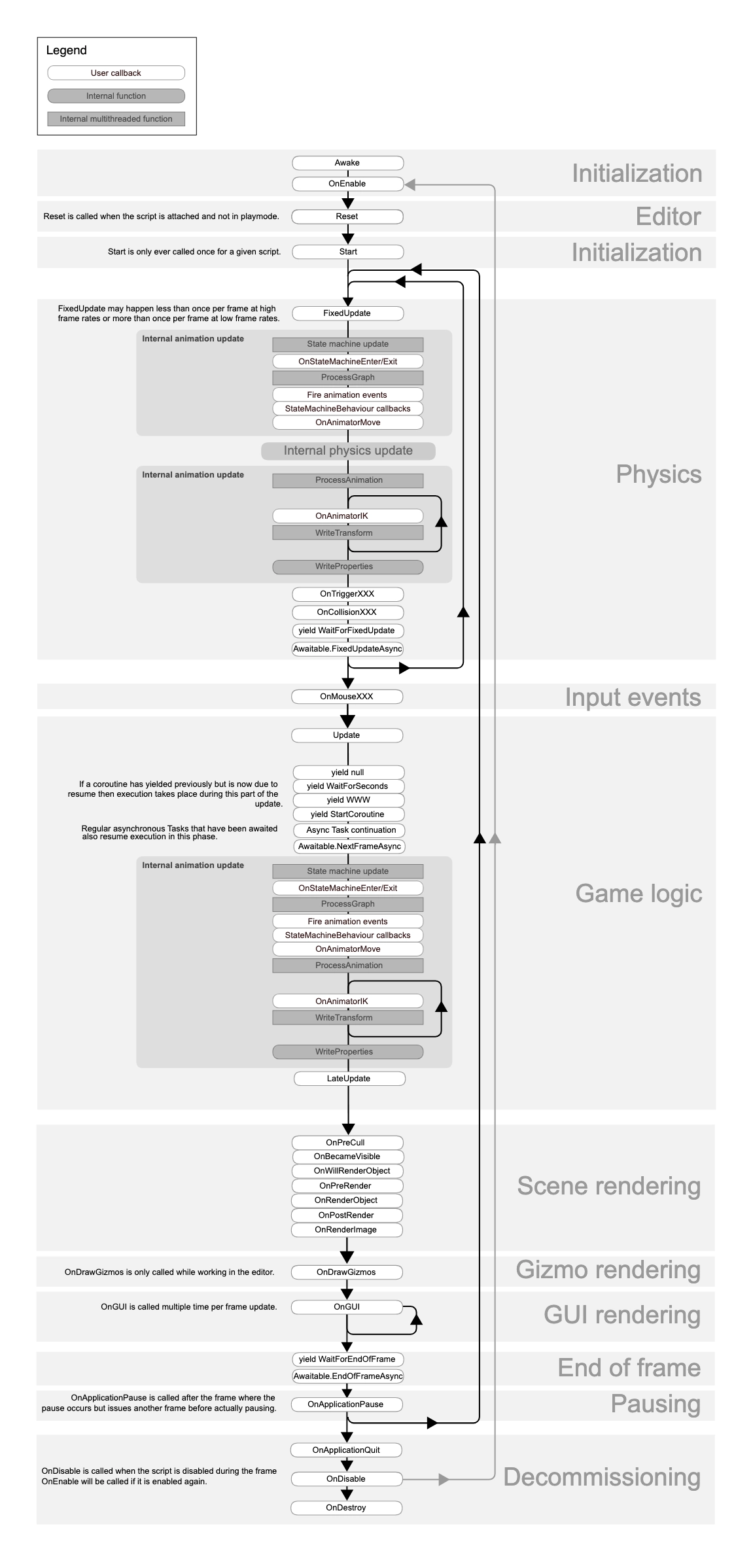
Unity has a specific order when running scripts in a frame:
- FixedUpdate (0–n times depending on Time.fixedDeltaTime).
- Update (called for all scripts).
- LateUpdate.
- Rendering (OnPreRender, OnRenderObject, OnPostRender, OnRenderImage).
- Gizmos (OnDrawGizmos for the Editor).
- Coroutines (IEnumerator with
yield).
⚡ Important: Unity allows adjusting script execution order in Project Settings > Script Execution Order.
3. Other special events in the lifecycle
In addition to the sequence above, there are many other callbacks:
- OnApplicationPause(bool pause) → called when the app is sent to the background (mobile).
- OnApplicationFocus(bool focus) → called when focus is lost/regained.
- OnApplicationQuit() → called when the app closes (editor playmode stop also calls it).
- OnValidate() → called in Editor whenever serialized values change (Inspector).
- Reset() → called when you attach the script for the first time or choose Reset from the component menu.
4. Coroutine Lifecycle
Coroutine (IEnumerator) has its own lifecycle:
StartCoroutine()→ runs in parallel with Update.yield return null→ waits 1 frame.yield return new WaitForSeconds(t)→ waits t real seconds.- Coroutine is stopped if GameObject it is disabled or
StopCoroutine/StopAllCoroutinescalled.
5. Lifecycle in the Editor
If you make tools or Editor scripts, there is also:
- [ExecuteInEditMode] → script runs even in the editor, without needing Play.
- OnDrawGizmos() → draw gizmos in the Scene view.
- OnValidate() → update when editing the Inspector.
6. Advanced lifecycle management
- Dependency Injection (Zenject/Extenject): inject dependency in
Awakeinstead ofStart. - Pooling: reuse GameObject → avoid calling
Awake/Starttoo many (useOnEnable/OnDisableinstead of Destroy). - Async (UniTask/Task): replace Coroutine for a clearer flow.
- Separation of Concern:
Awake: assign reference.OnEnable: register event.Start: gameplay init logic.OnDisable: unregister event.OnDestroy: cleanup.
7. Lifecycle illustration GameObject
Awake()
↓
OnEnable()
↓
Start()
↓
(Update → LateUpdate → FixedUpdate) [Loop đến khi disable/destroy]
↓
OnDisable()
↓
OnDestroy()
✅ In summary:
- Awake: initialize variables (even if disabled).
- OnEnable: register event, reset.
- Start: initialize gameplay logic.
- Update: every frame.
- FixedUpdate: physics.
- LateUpdate: camera/cleanup : after Update.
- OnDisable: clear event.
- OnDestroy: final cleanup.